


Case study
JournalFlow
Keep a journal in your favorite messaging app.
role
Only designer
Platform
Web
My Contribution
UI / UX Design
Product Management
Branding
Introduction
JournalFlow is a Journal product integrated with messengers; in other words, you can use it to write journals from your favorite messengers, such as Telegram and Facebook Messenger.
We will save the text, photos, videos, locations sent from you and put them as your journal of the day. The process is just like chatting with a friend.
It’s invisible at most time, just like an assistant. However, when you need to edit or see previous journals, you can sign in on our Web App. The Web App is designed for both desktop and mobile.
Check it out: https://www.journalflow.com/

The inspiration
About ten years ago, I was a user of a journal product named “Ohlife”. Like all great ideas, OhLife works quite simple: Every day, OhLife will send you an email that asks: How did your day go? All you have to do is reply to the email; then the content will be recorded as your journal of the day.
What makes Ohlife a great product?
Despite its elegant website design, Ohlife creates a brand new way to write journals. To those people who don't keep a digital journal, writing journals could be a burden. Writing journals mean these procedures: sign in the website, write down your feeling, upload a photo. Then repeat it the following days. That's why it's hard to build a habit of journaling, although there are many journal tools on the market.
Email is different, and people use it almost every day. Journaling and email seem like different kinds of product and not relevant at all. But when Ohlife put them together into one product, something interesting happened: it makes writing journals much easier and less stressful.
- First, you don't need to remind yourself to write journals anymore, it's a great relief. Whenever you open your email, it's there, just reply.
- Second, it makes the writing experience personal. You can decide when to reply and what to write. And the content is entirely based on your mood, if you have a meaningful day, you can write down the whole story; if you feel tired and don't want to talk, just ignore the email, it's fine. It's incredibly flexible.
Overall, Ohlife is a simple and neat tool without any clutter. I kept writing about 1000 journals until it had shut down in 2014. After Ohlife closed, I tried some journaling products with similar features, but almost all of them were far from Ohlife in terms of design and experience. So I went back to the physical handbook.
In the next few years, instant messaging tools at home and abroad developed rapidly and gradually occupied more and more usage scenarios, especially after WeChat released its mini-programs, we started to think of tools that combined diary and IM.
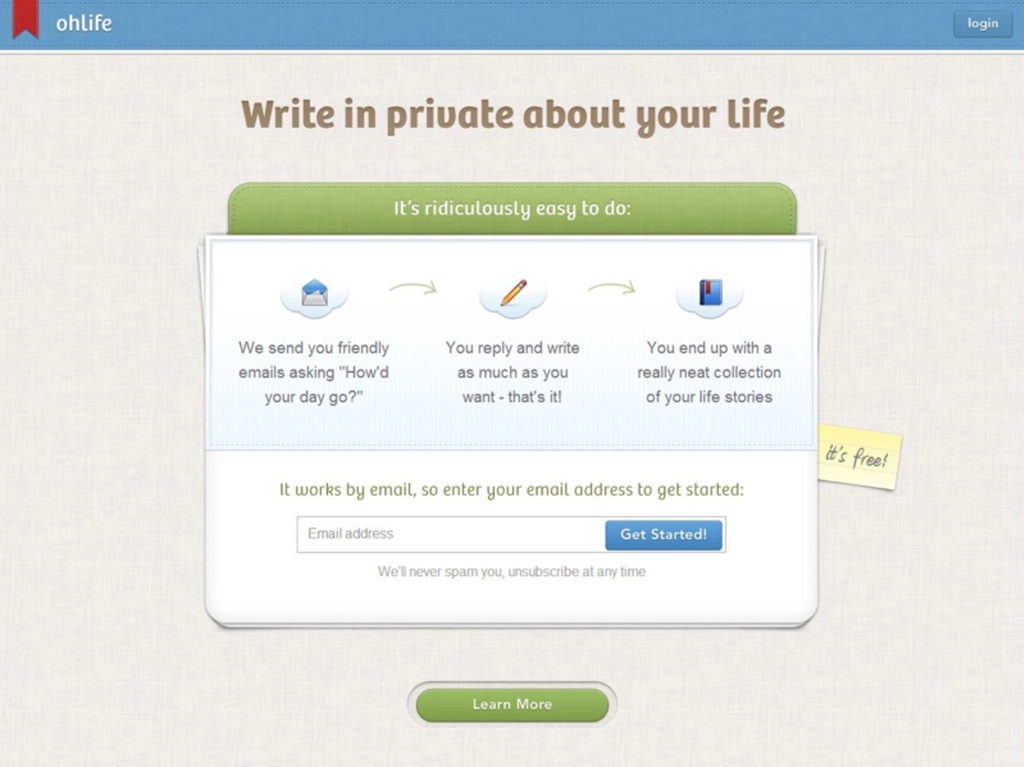
Ohlife website screenshot
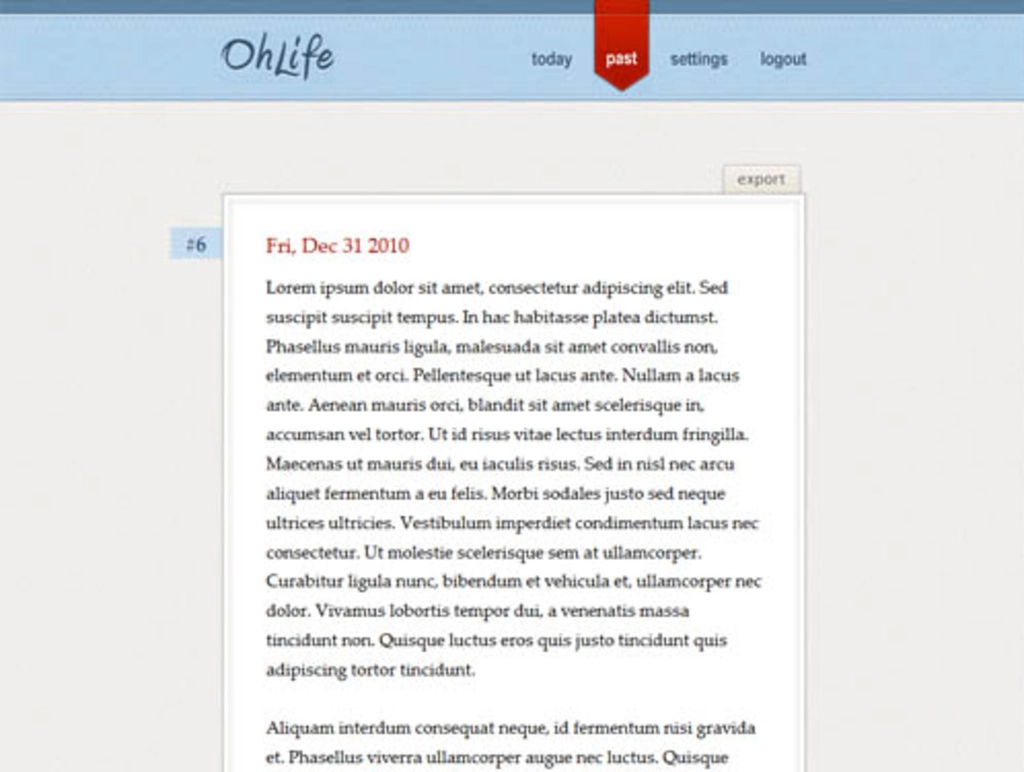
Ohlife website screenshot: Journal page
Our goal
Our goal is to make it easy for users to record and remember things happened in their life.
In order to achieve this goal, JournalFlow adds the following features:
- Multiple Formats: Don't limit by texts. You can add photos, locations, moods in your journal. Audio and video support are coming soon.
- Mood Calendar: Looking back at your mood over the long-term, find out whether you need to change something in your life.
- Time Machine: Bring back your best memories.
- ...

JournalFlow features
One step further
After we finish the post-by-messenger feature, we planned to add a new feature to JournalFlow. Because we noticed the fact that emoji is becoming much popular in recent years, it exists on almost every social network and messenger. Users are familiar with emoji and use it to express their feelings. It's simple but powerful. One emoji conveys much information than several words. Also, it's easy to use. So we decided to bring emoji into our product. We add a 'mood' to every journal and a mood calendar to track your mood in the long term. Users can send emojis which represent their current feelings directly from messengers, and the emoji will be the mood of the day, you can have several moods in one day. After saving for a week or a month, you can see your mood trend in the Mood Calendar.
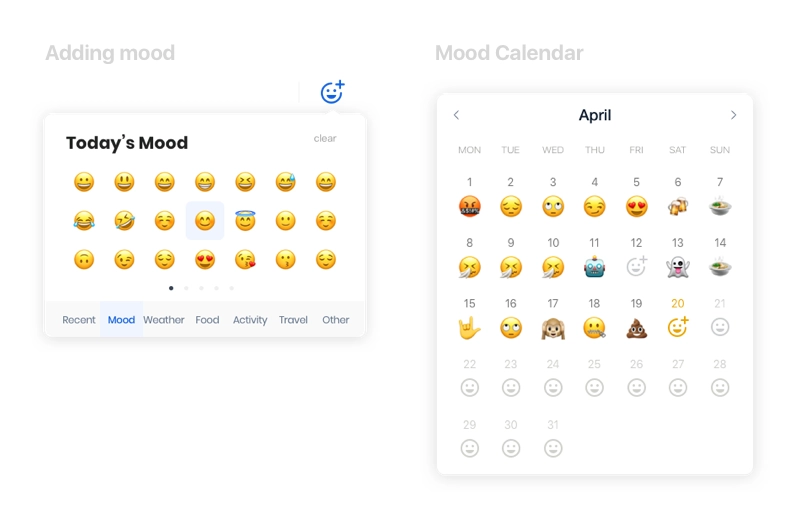
Mood in JournalFlow
A seamless experience
Most messengers provide cross-platform support, it means users may visit our web app from different devices, phones, tablets, laptops or even large screens. We need to make sure JournalFlow works well on any platform where users' messengers live.
So we make our Web App responsive, it can adapt to different resolutions.
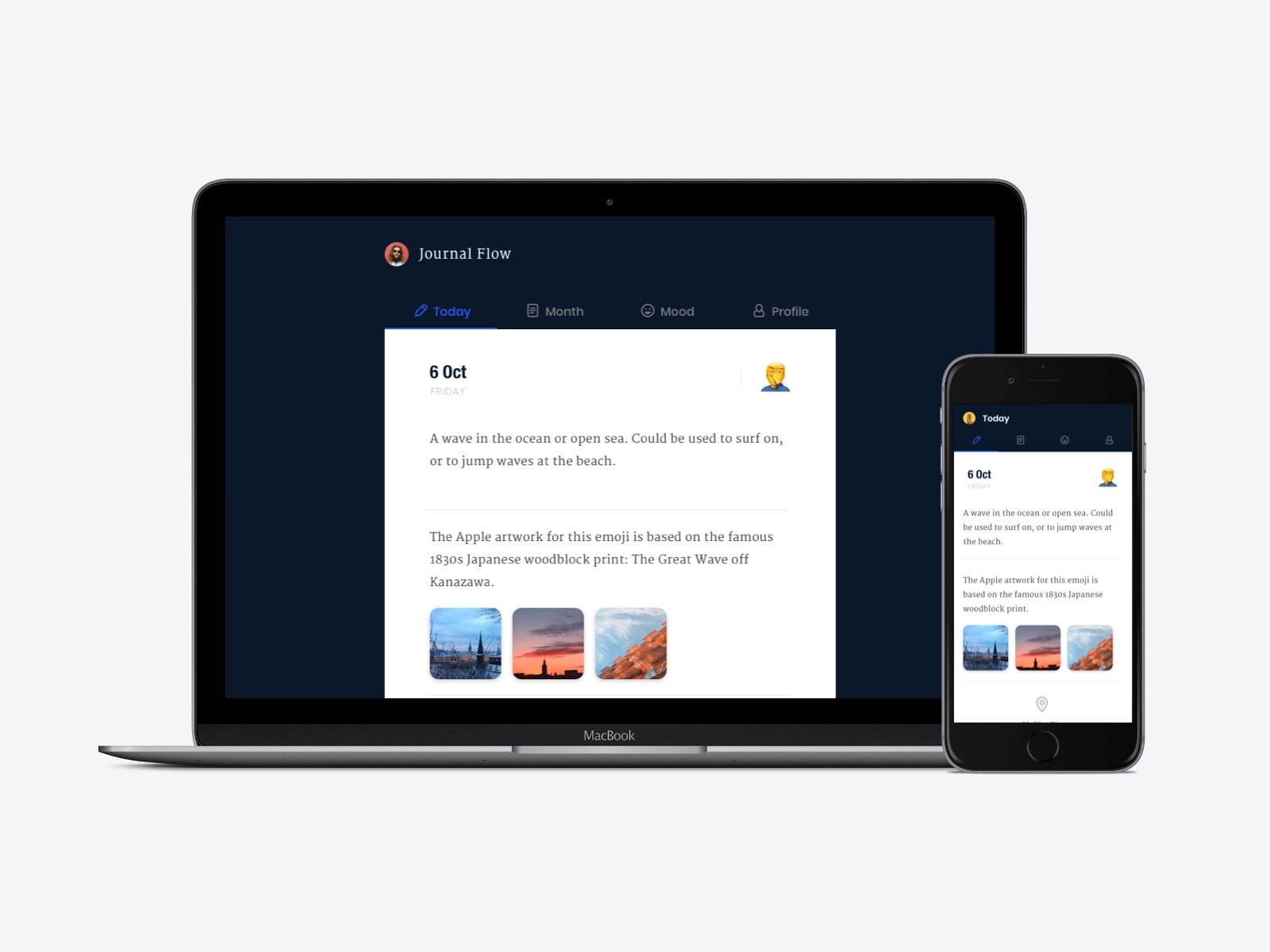
Responsive design of JournalFlow
Final Design
Welcome to visit journalflow.com to experience it.
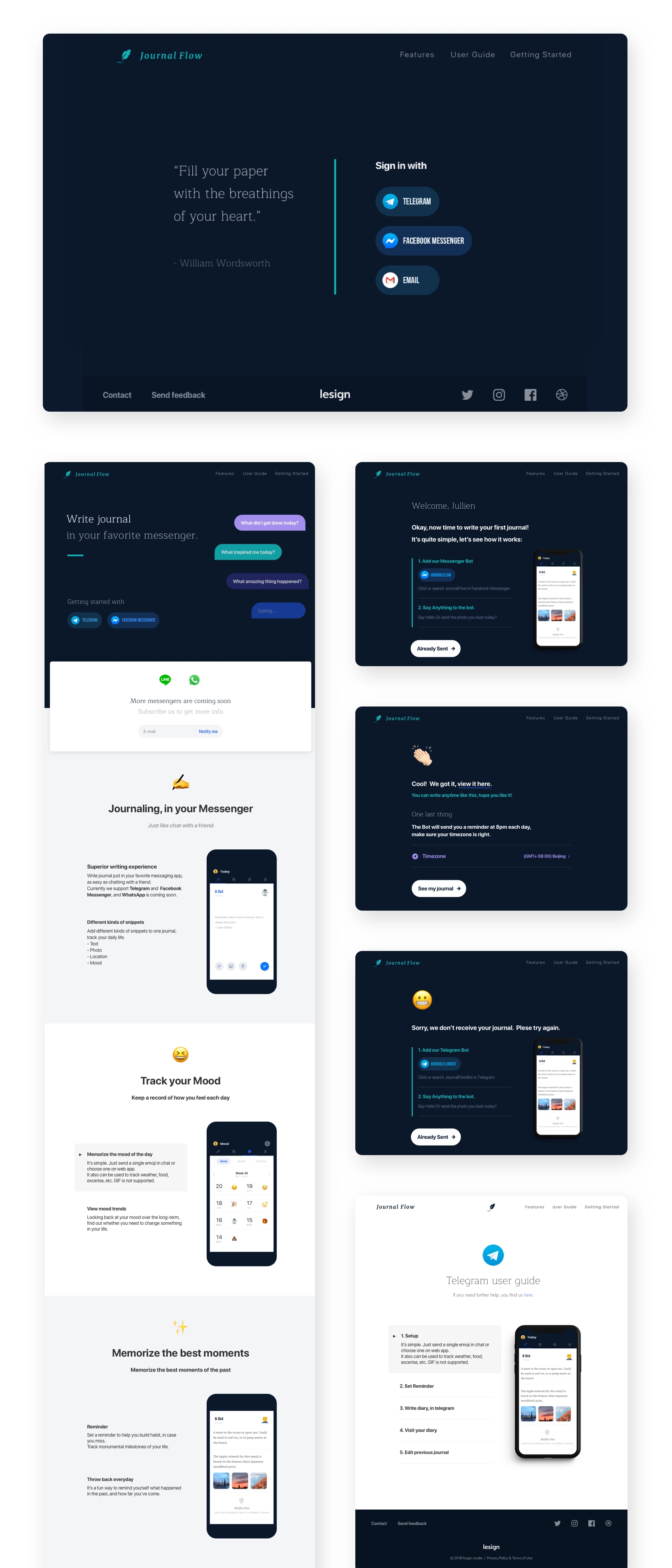
Landing Page and User Onboarding Flows
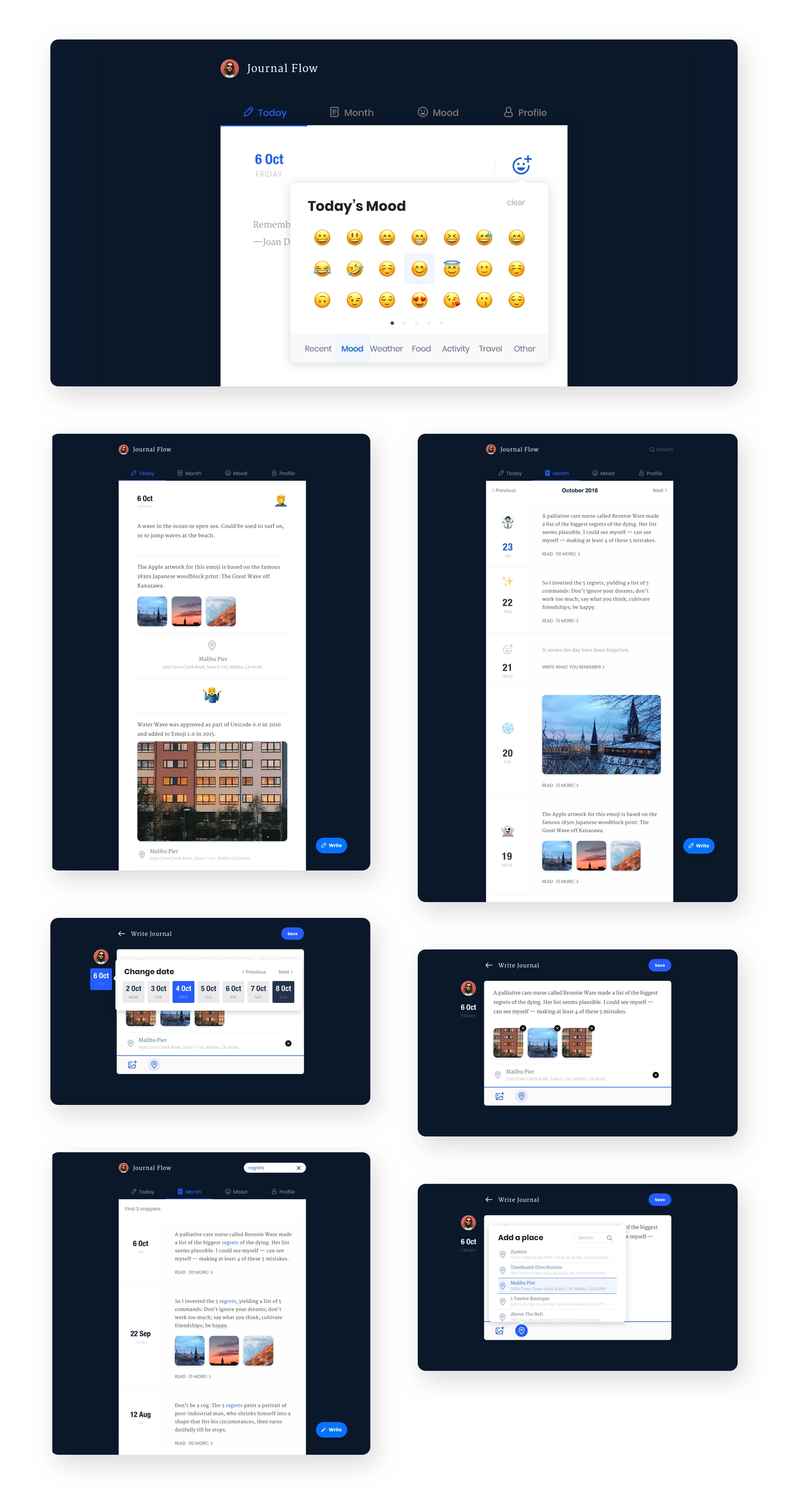
Browse and create diary pages.
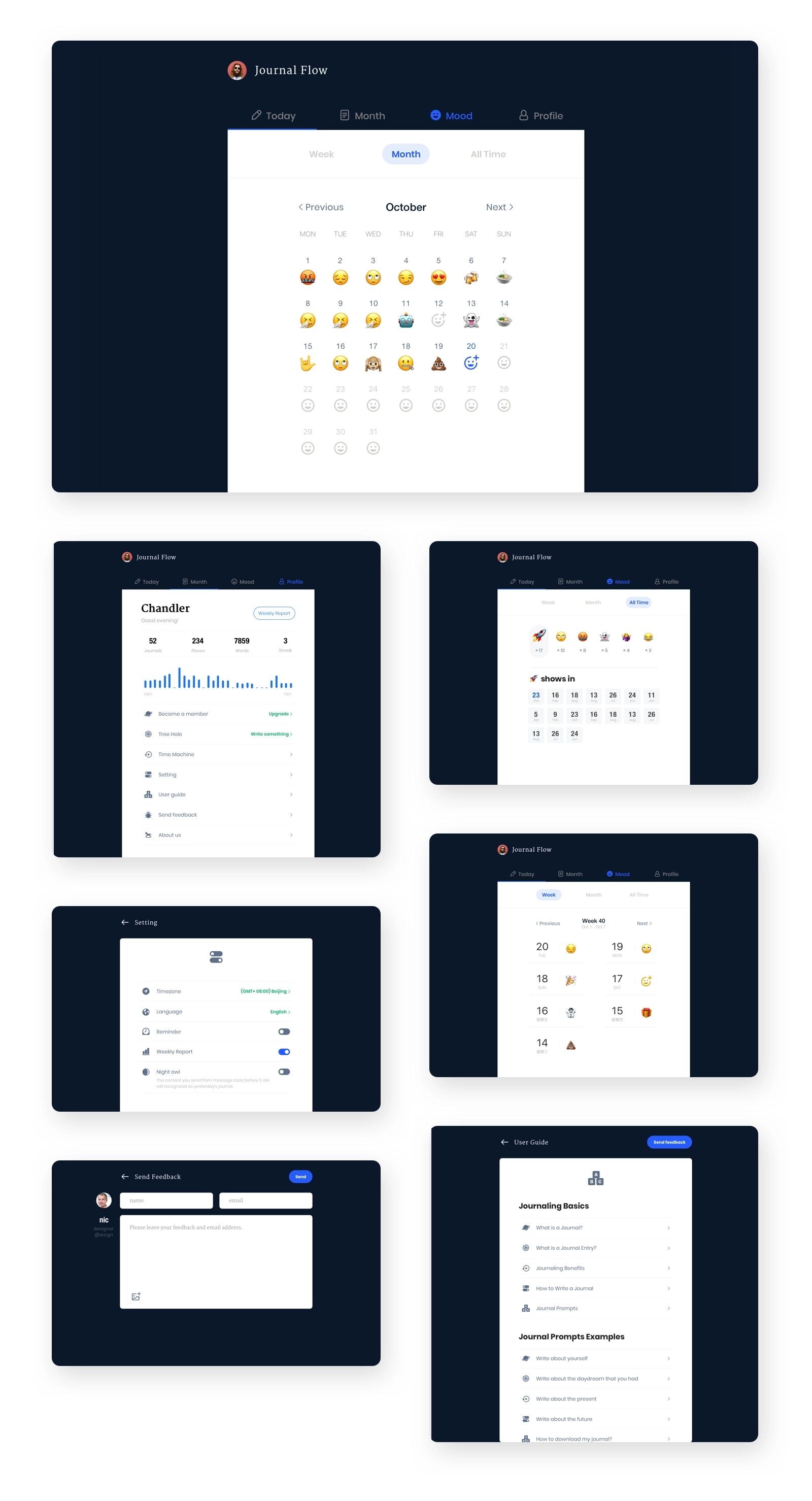
Mood and setting pages
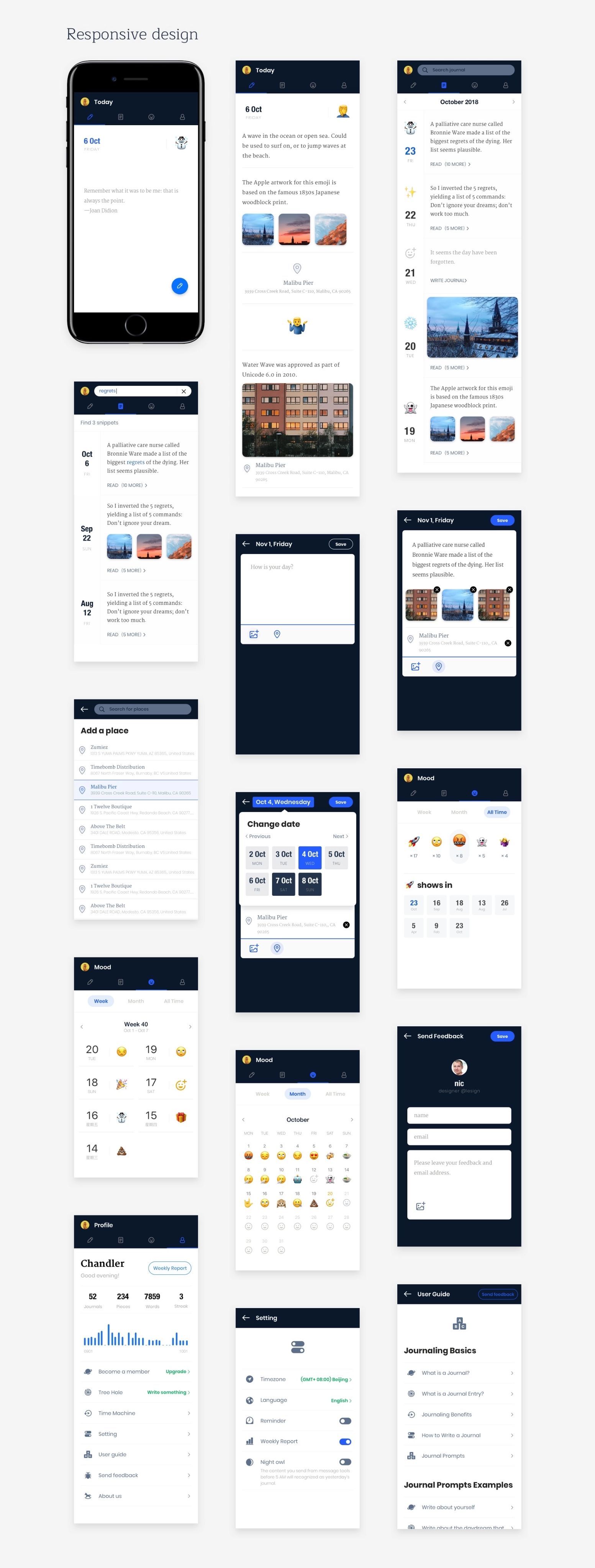
Adapt for mobile devices
Thanks for watching!
Case study
JournalFlow
Keep a journal in your favorite messaging app.
role
Only designer
Platform
Web
My Contribution
UI / UX Design
Product Management
Branding
Introduction
JournalFlow is a Journal product integrated with messengers; in other words, you can use it to write journals from your favorite messengers, such as Telegram and Facebook Messenger.
We will save the text, photos, videos, locations sent from you and put them as your journal of the day. The process is just like chatting with a friend.
It’s invisible at most time, just like an assistant. However, when you need to edit or see previous journals, you can sign in on our Web App. The Web App is designed for both desktop and mobile.
Check it out: https://www.journalflow.com/

The inspiration
About ten years ago, I was a user of a journal product named “Ohlife”. Like all great ideas, OhLife works quite simple: Every day, OhLife will send you an email that asks: How did your day go? All you have to do is reply to the email; then the content will be recorded as your journal of the day.
What makes Ohlife a great product?
Despite its elegant website design, Ohlife creates a brand new way to write journals. To those people who don't keep a digital journal, writing journals could be a burden. Writing journals mean these procedures: sign in the website, write down your feeling, upload a photo. Then repeat it the following days. That's why it's hard to build a habit of journaling, although there are many journal tools on the market.
Email is different, and people use it almost every day. Journaling and email seem like different kinds of product and not relevant at all. But when Ohlife put them together into one product, something interesting happened: it makes writing journals much easier and less stressful.
- First, you don't need to remind yourself to write journals anymore, it's a great relief. Whenever you open your email, it's there, just reply.
- Second, it makes the writing experience personal. You can decide when to reply and what to write. And the content is entirely based on your mood, if you have a meaningful day, you can write down the whole story; if you feel tired and don't want to talk, just ignore the email, it's fine. It's incredibly flexible.
Overall, Ohlife is a simple and neat tool without any clutter. I kept writing about 1000 journals until it had shut down in 2014. After Ohlife closed, I tried some journaling products with similar features, but almost all of them were far from Ohlife in terms of design and experience. So I went back to the physical handbook.
In the next few years, instant messaging tools at home and abroad developed rapidly and gradually occupied more and more usage scenarios, especially after WeChat released its mini-programs, we started to think of tools that combined diary and IM.
Ohlife website screenshot
Ohlife website screenshot: Journal page
Our goal
Our goal is to make it easy for users to record and remember things happened in their life.
In order to achieve this goal, JournalFlow adds the following features:
- Multiple Formats: Don't limit by texts. You can add photos, locations, moods in your journal. Audio and video support are coming soon.
- Mood Calendar: Looking back at your mood over the long-term, find out whether you need to change something in your life.
- Time Machine: Bring back your best memories.
- ...
JournalFlow features
One step further
After we finish the post-by-messenger feature, we planned to add a new feature to JournalFlow. Because we noticed the fact that emoji is becoming much popular in recent years, it exists on almost every social network and messenger. Users are familiar with emoji and use it to express their feelings. It's simple but powerful. One emoji conveys much information than several words. Also, it's easy to use. So we decided to bring emoji into our product. We add a 'mood' to every journal and a mood calendar to track your mood in the long term. Users can send emojis which represent their current feelings directly from messengers, and the emoji will be the mood of the day, you can have several moods in one day. After saving for a week or a month, you can see your mood trend in the Mood Calendar.
Mood in JournalFlow
A seamless experience
Most messengers provide cross-platform support, it means users may visit our web app from different devices, phones, tablets, laptops or even large screens. We need to make sure JournalFlow works well on any platform where users' messengers live.
So we make our Web App responsive, it can adapt to different resolutions.
Responsive design of JournalFlow
Final Design
Welcome to visit journalflow.com to experience it.
Landing Page and User Onboarding Flows
Browse and create diary pages.
Mood and setting pages
Adapt for mobile devices
Thanks for watching!
Navigation

Link
journalflow.com
Case study
JournalFlow
Keep a journal in your favorite messaging app.
role
Only designer
Platform
Web
My Contribution
UI / UX Design
Product Management
Branding
Introduction
JournalFlow is a Journal product integrated with messengers; in other words, you can use it to write journals from your favorite messengers, such as Telegram and Facebook Messenger.
We will save the text, photos, videos, locations sent from you and put them as your journal of the day. The process is just like chatting with a friend.
It’s invisible at most time, just like an assistant. However, when you need to edit or see previous journals, you can sign in on our Web App. The Web App is designed for both desktop and mobile.
Check it out: https://www.journalflow.com/

The inspiration
About ten years ago, I was a user of a journal product named “Ohlife”. Like all great ideas, OhLife works quite simple: Every day, OhLife will send you an email that asks: How did your day go? All you have to do is reply to the email; then the content will be recorded as your journal of the day.
What makes Ohlife a great product?
Despite its elegant website design, Ohlife creates a brand new way to write journals. To those people who don't keep a digital journal, writing journals could be a burden. Writing journals mean these procedures: sign in the website, write down your feeling, upload a photo. Then repeat it the following days. That's why it's hard to build a habit of journaling, although there are many journal tools on the market.
Email is different, and people use it almost every day. Journaling and email seem like different kinds of product and not relevant at all. But when Ohlife put them together into one product, something interesting happened: it makes writing journals much easier and less stressful.
- First, you don't need to remind yourself to write journals anymore, it's a great relief. Whenever you open your email, it's there, just reply.
- Second, it makes the writing experience personal. You can decide when to reply and what to write. And the content is entirely based on your mood, if you have a meaningful day, you can write down the whole story; if you feel tired and don't want to talk, just ignore the email, it's fine. It's incredibly flexible.
Overall, Ohlife is a simple and neat tool without any clutter. I kept writing about 1000 journals until it had shut down in 2014. After Ohlife closed, I tried some journaling products with similar features, but almost all of them were far from Ohlife in terms of design and experience. So I went back to the physical handbook.
In the next few years, instant messaging tools at home and abroad developed rapidly and gradually occupied more and more usage scenarios, especially after WeChat released its mini-programs, we started to think of tools that combined diary and IM.
Ohlife website screenshot
Ohlife website screenshot: Journal page
Our goal
Our goal is to make it easy for users to record and remember things happened in their life.
In order to achieve this goal, JournalFlow adds the following features:
- Multiple Formats: Don't limit by texts. You can add photos, locations, moods in your journal. Audio and video support are coming soon.
- Mood Calendar: Looking back at your mood over the long-term, find out whether you need to change something in your life.
- Time Machine: Bring back your best memories.
- ...
JournalFlow features
One step further
After we finish the post-by-messenger feature, we planned to add a new feature to JournalFlow. Because we noticed the fact that emoji is becoming much popular in recent years, it exists on almost every social network and messenger. Users are familiar with emoji and use it to express their feelings. It's simple but powerful. One emoji conveys much information than several words. Also, it's easy to use. So we decided to bring emoji into our product. We add a 'mood' to every journal and a mood calendar to track your mood in the long term. Users can send emojis which represent their current feelings directly from messengers, and the emoji will be the mood of the day, you can have several moods in one day. After saving for a week or a month, you can see your mood trend in the Mood Calendar.
Mood in JournalFlow
A seamless experience
Most messengers provide cross-platform support, it means users may visit our web app from different devices, phones, tablets, laptops or even large screens. We need to make sure JournalFlow works well on any platform where users' messengers live.
So we make our Web App responsive, it can adapt to different resolutions.
Responsive design of JournalFlow
Final Design
Welcome to visit journalflow.com to experience it.
Landing Page and User Onboarding Flows
Browse and create diary pages.
Mood and setting pages
Adapt for mobile devices
Thanks for watching!
Navigation
