

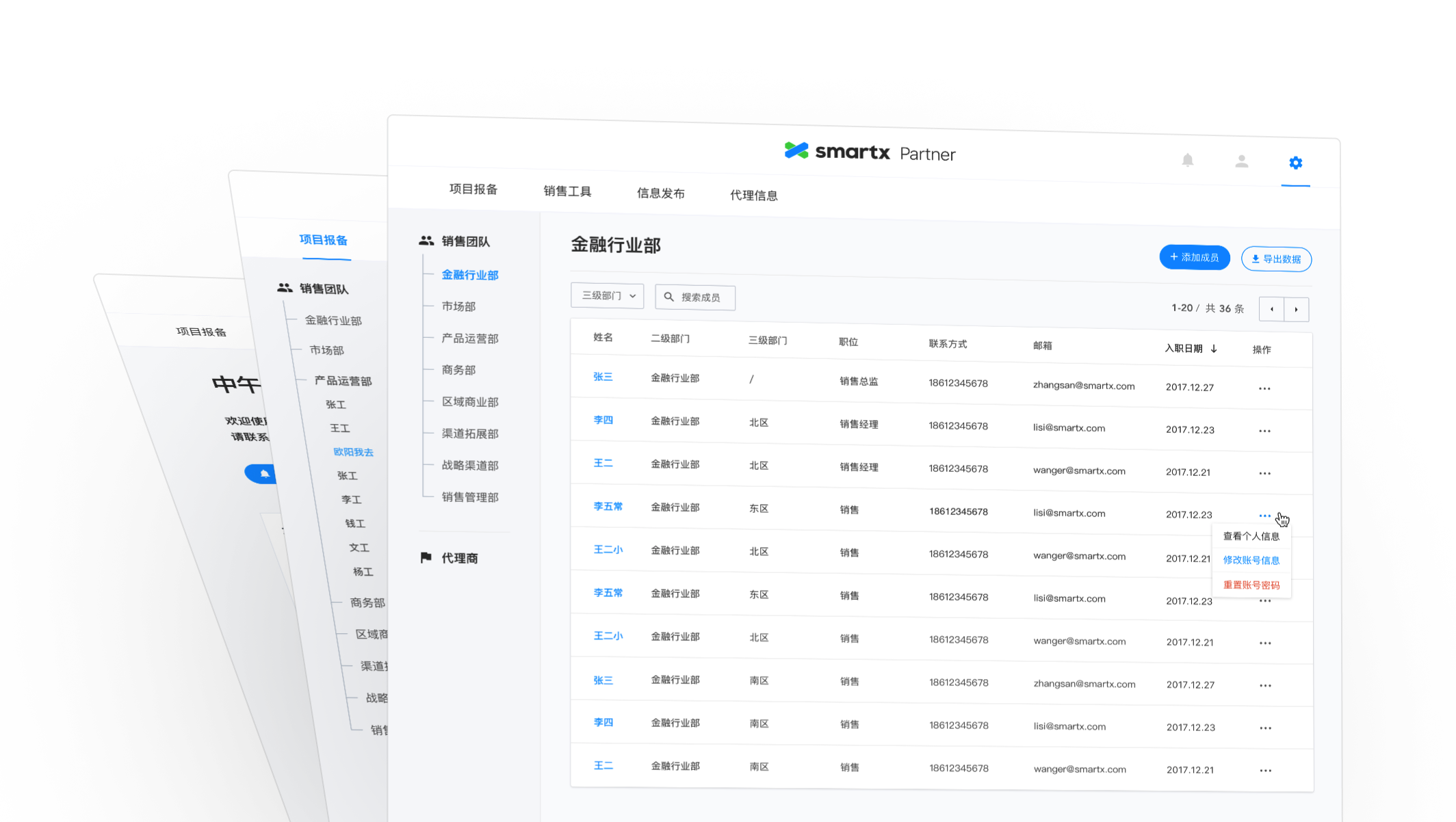
Case study
SmartX After-sales System
Designing a system with a large amount of data, complex permissions, and multiple departments involved.
role
Only designer
Platform
Web
My Contribution
UI / UX Design
Product Management
Project Management
Introduction
After-sales system is another project with SmartX after partner website. SmartX is a leading hyper-converged product and enterprise cloud solution provider in China, offering self-developed SMTX OS software and all-in-one hardware products to enterprise customers. This time, the requirement is for the after-sales department, which wants to build a system to manage customer relationship and provide after-sales service for customers.
SmartX is divided into sales, marketing, commercial and after-sales departments, and each sale to a customer requires multiple departments to complete: pre-sales engineers communicate with customers about their needs → sign contracts with customers → after-sales engineers visit the customer to implement and install the product → after-sales service.
The after-sales department relies heavily on the mastery of customer information, hardware environment and cluster information to locate problems and provide solutions based on these information when providing after-sales services to customers. Since each process is under the responsibility of different departments, there will be delays in synchronizing information between departments, and the after-sales department only starts to participate in the late stage of the process, so it often cannot grasp the complete information, which makes it more difficult to locate the problem, and the efficiency and satisfaction of after-sales service is difficult to be guaranteed.
Therefore, we want to build a system that can be used by colleagues from sales, commercial and after-sales departments together, covering the entire after-sales process from customer signing, recording sales contracts, entering customer information, generating after-sales service numbers, installing and supplementing actual customer cluster information at home, and checking the warranty period of products purchased by customers.
The Goal is to achieve:
- Generation of a UUID service code for the customer at the time of contract signing.
- Entry of customer information and contract information by the commercial department, including the number of software and hardware purchased.
- Automatic calculation by the system of the after-sales service period according to the customer's purchase time (the service period varies for different devices).
- When a customer encounters a problem and contacts the after-sales department, by providing the service verification code, the after-sales department can obtain customer information, hardware information, cluster information, etc. to quickly locate the problem.

Design Challenge
System with large amount of data, complex permissions, and multi-department involvement.
- Heavy data
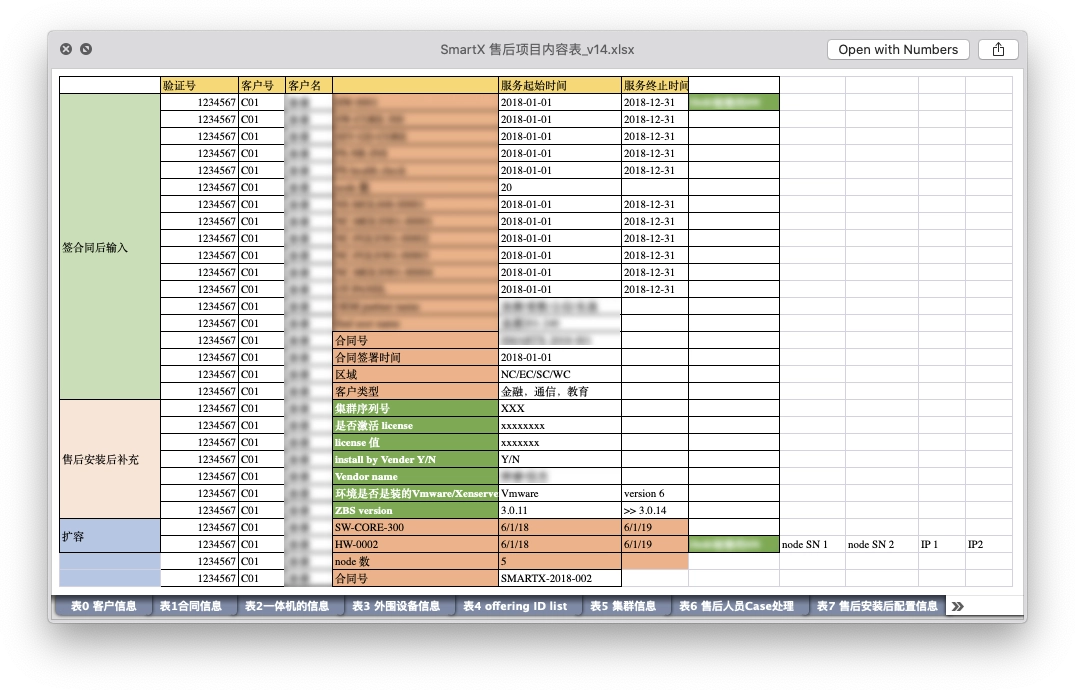
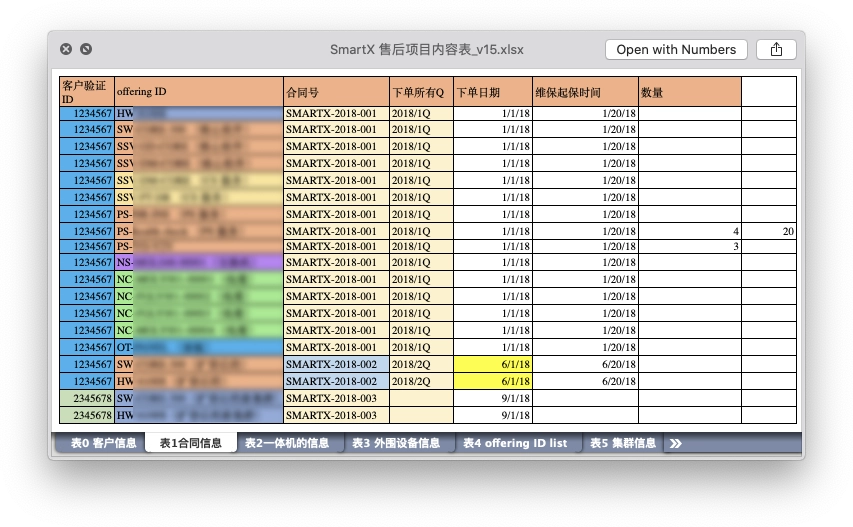
Contract data, customer information, cluster information, each of which used to be maintained by multiple tables, now we need to add all these data into the system. This also means that we have to deal with a large amount of data and forms. How can we ensure the experience when entering and maintaining them, and reduce the possibility of errors?
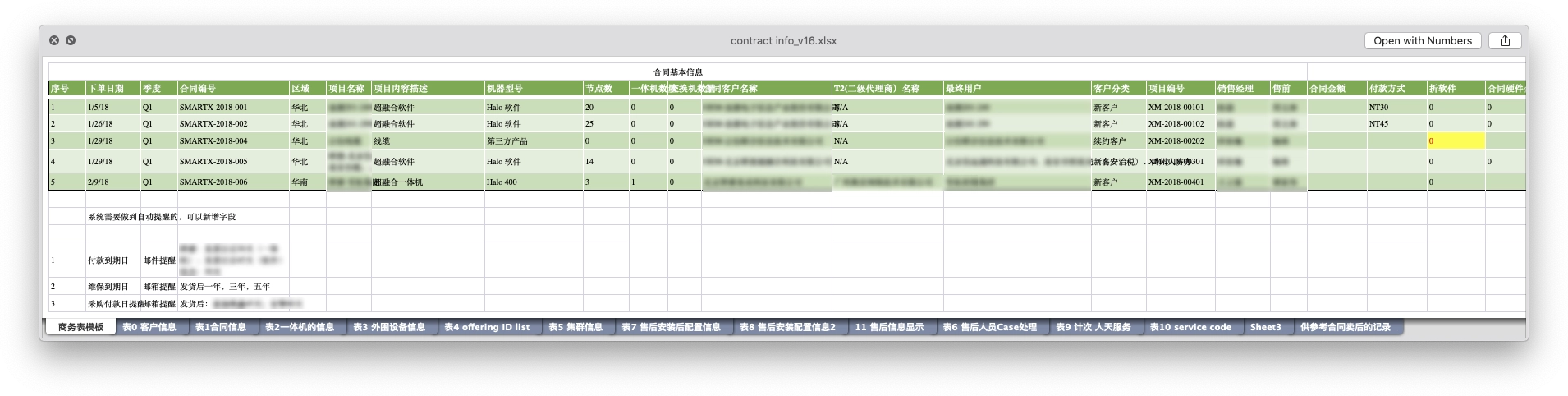
Clients’ data were maintained in multiple tables.
2. Complex inter-departmental permissions
The software and hardware procured in a contract can be used to create one cluster, or multiple clusters may be created. In turn, equipment purchased multiple times by users may be used for the same cluster expansion. Therefore the association between contracts and clusters needs to be designed flexibly to ensure the integrity and timeliness of customer data.
3. Mutual coupling of resources
The system will be used by colleagues in sales, commercial and after-sales departments together, and members of each department have corresponding responsibilities, which correspond to different operation rights in the system, and account system and member rights need to be carefully considered.
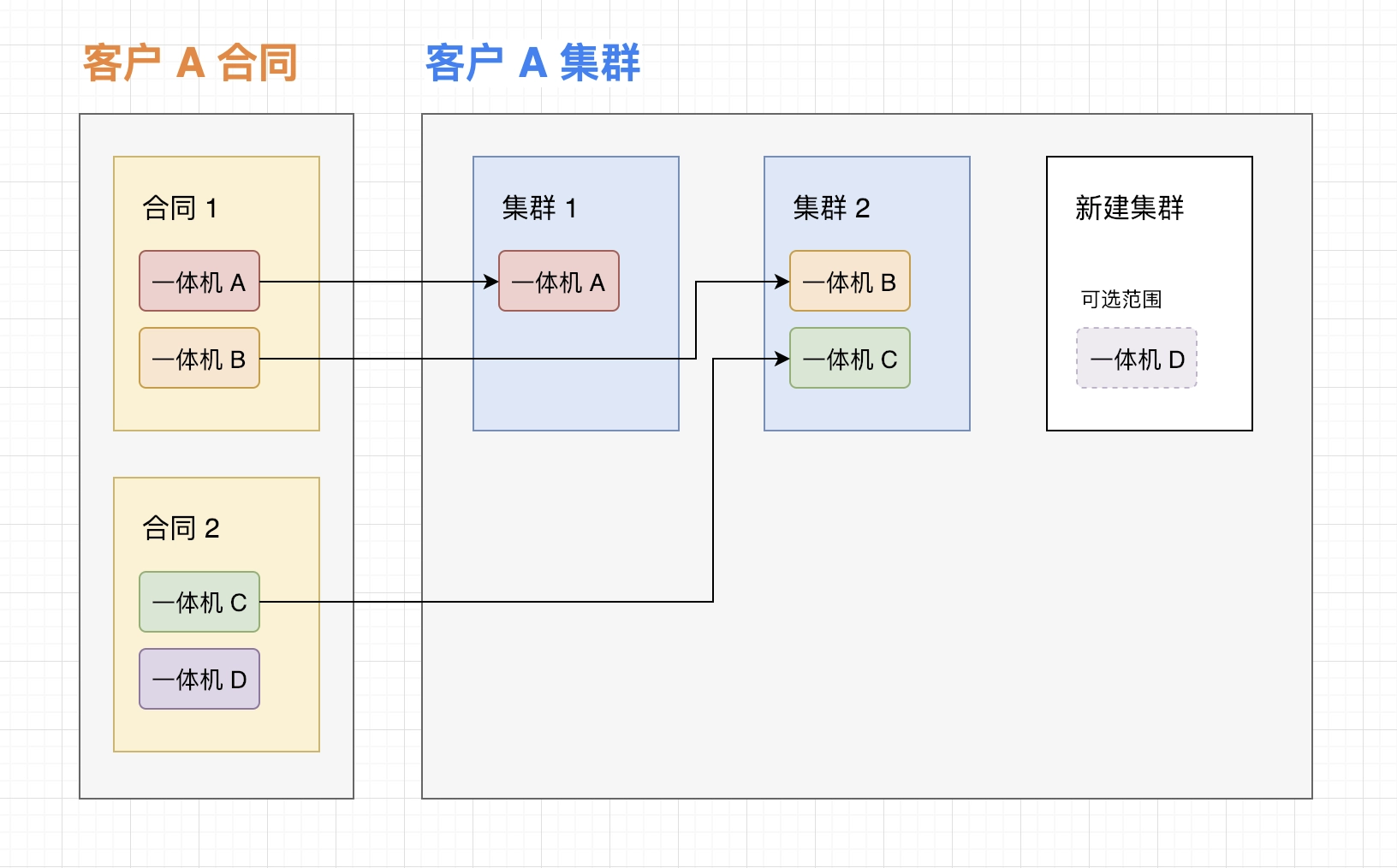
The relationship between contracts and clusters.
Design Process
1. User Interviews: Identifying Problems
The main users of the after-sales service system involve members of several departments in commerce and after-sales, so it is important to understand their daily workflow. Before the project started, we interviewed the actual users of the product (after-sales, commercial department members, after-sales person in charge) to understand these issues.
- The current division of responsibilities and workflow of each department.
- How the departments communicate and collaborate with each other.
- The common types of contracts signed with customers.
- What common problems customers encounter.
- The process of handling problems in the after-sales department.
After 3~4 rounds of in-person communication, we have an overall understanding of the obstacles that the after-sales department will encounter in practice, and the main problems that exist are.
1.1 Lack of unique traceable service verification number for sold goods
Software or hardware sold to customers, the lack of a unique traceable service verification number. On the one hand, for companies, it is difficult for the after-sales department to track which devices customers have purchased, lacking a complete record of customer information and customer environment, and having to rely on after-sales engineers to visit and check; on the other hand, for customers, the lack of a unique number means that when they encounter problems contacting after-sales, they cannot prepare a description of the faulty device, increasing the difficulty of locating the problem.
1.2 Information barriers exist between departments
Providing a good after-sales service experience for customers relies on having complete information. Although there is a clear division of work responsibilities between departments, the mastery of customer information is scattered across departments, for example, customer information and contract information is obtained when the commercial department signs a contract with the customer, and customer cluster information is obtained when the after-sales staff comes to the house to implement the installation. In addition, the information synchronization between departments is not timely, which also affects the experience of after-sales service.
1.3 Lack of systematic management platform
In the past, contract and customer information was more often saved in Excel or Google Docs, and relied on manual control of visibility. For example, when the after-sales department needed customer or contract information, the commercial staff shared the forms or online documents with them, which was inefficient and prone to errors due to versions.
2. Requirements organization: clarify the product process
After understanding the existing workflow and problems of each department, we started to organize the requirements.
Firstly, after communicating with the client, we divided the project into 2 phases, phase 1 mainly included the basic construction of the platform and the cluster service verification function; phase 2 added advanced functions such as work order system, after-sales timing and statistical analysis on the basis of phase 1.
Then we started to work on the specific implementation details of Phase I. After the previous project SmartX partner website was built from scratch, we had more mature design ideas on the basic functions of account system, permission design and notification system, so this phase is more The output of this phase is the project requirement document containing the implementation details and the summary of the pages that need to be designed.
Based on the results of the interviews in the previous step, we organized the work responsibilities of the customer, business team and after-sales team in the system into a flow chart.
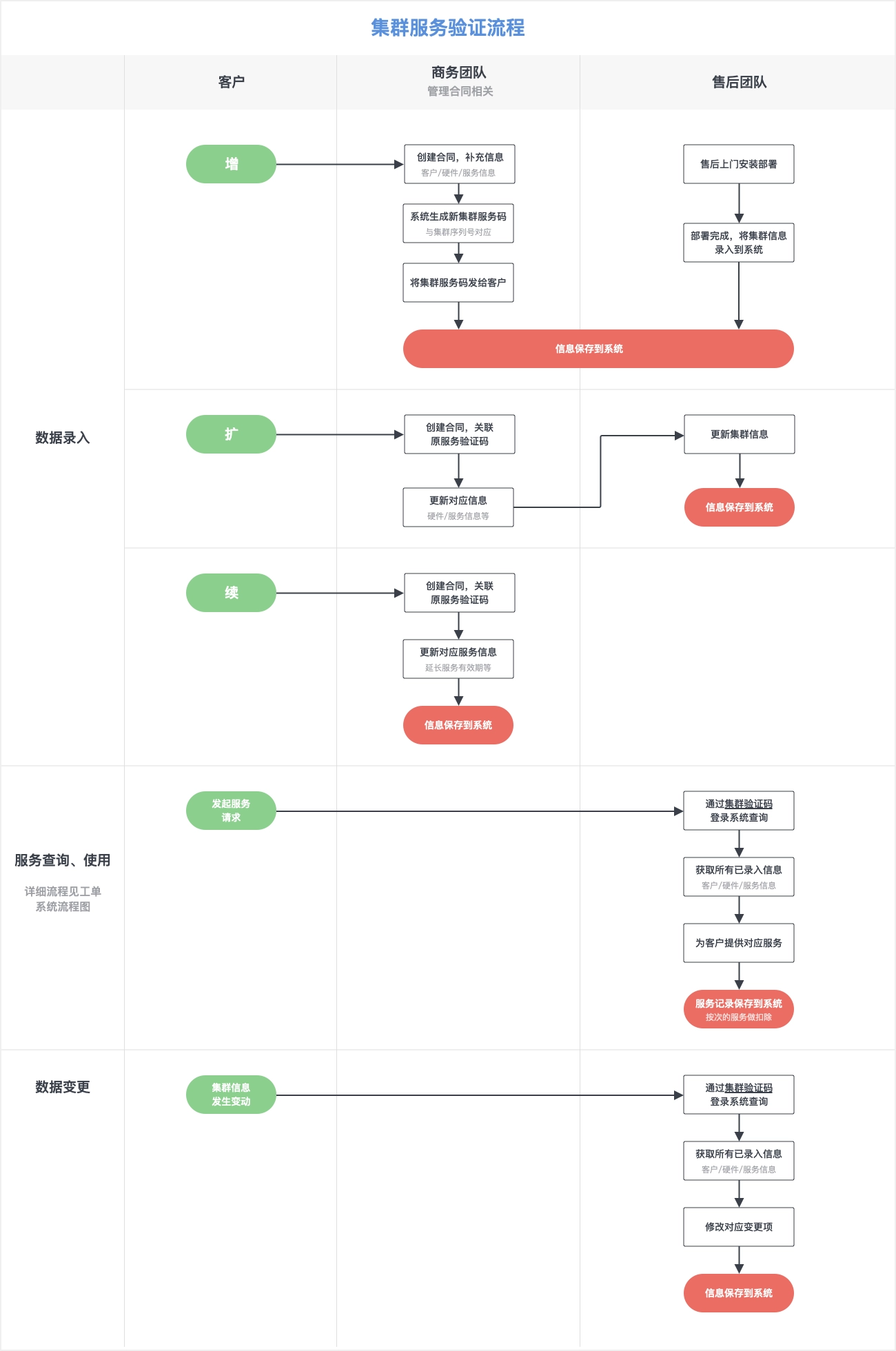
Contract Management Flowchart
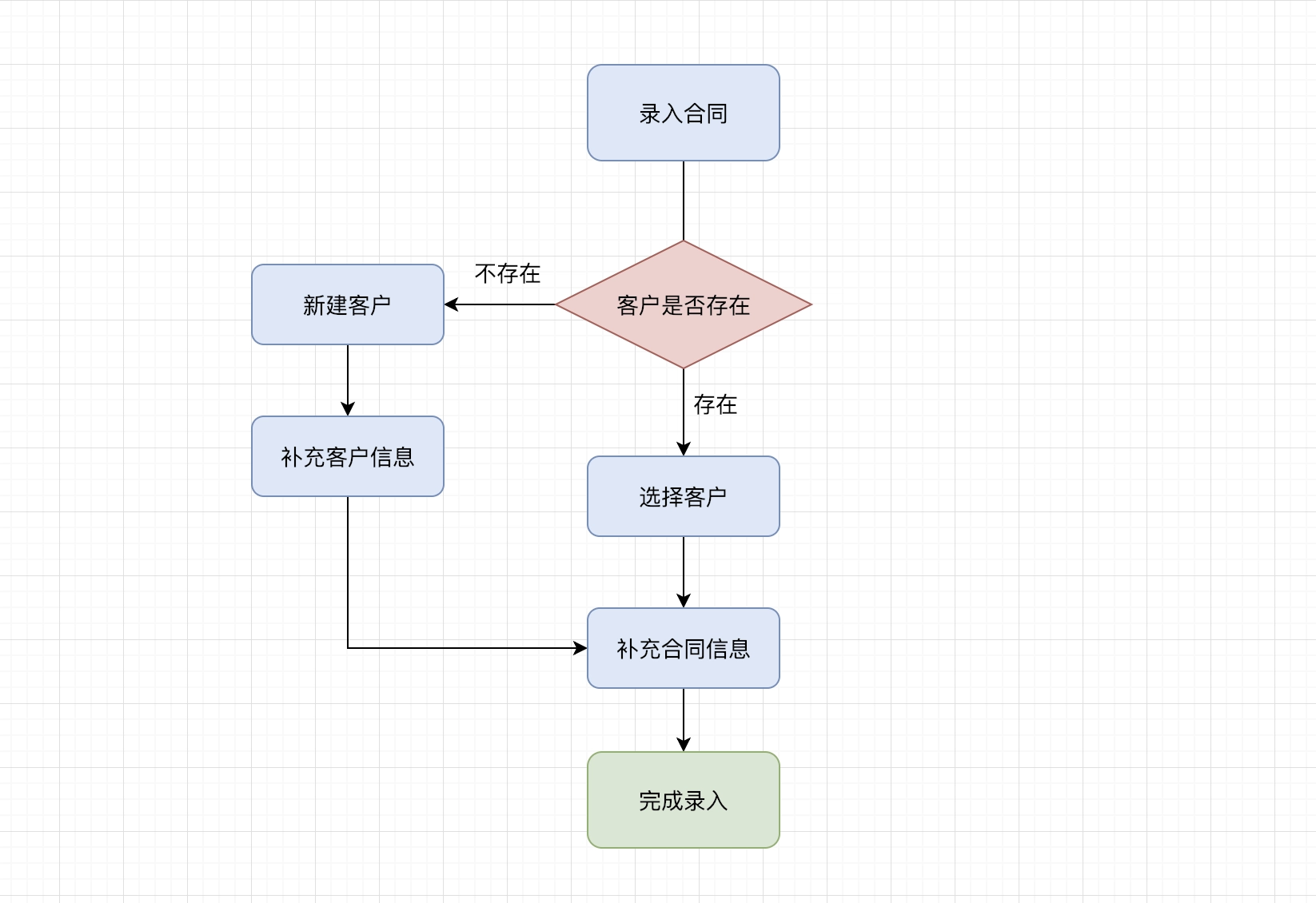
Process of adding a contract
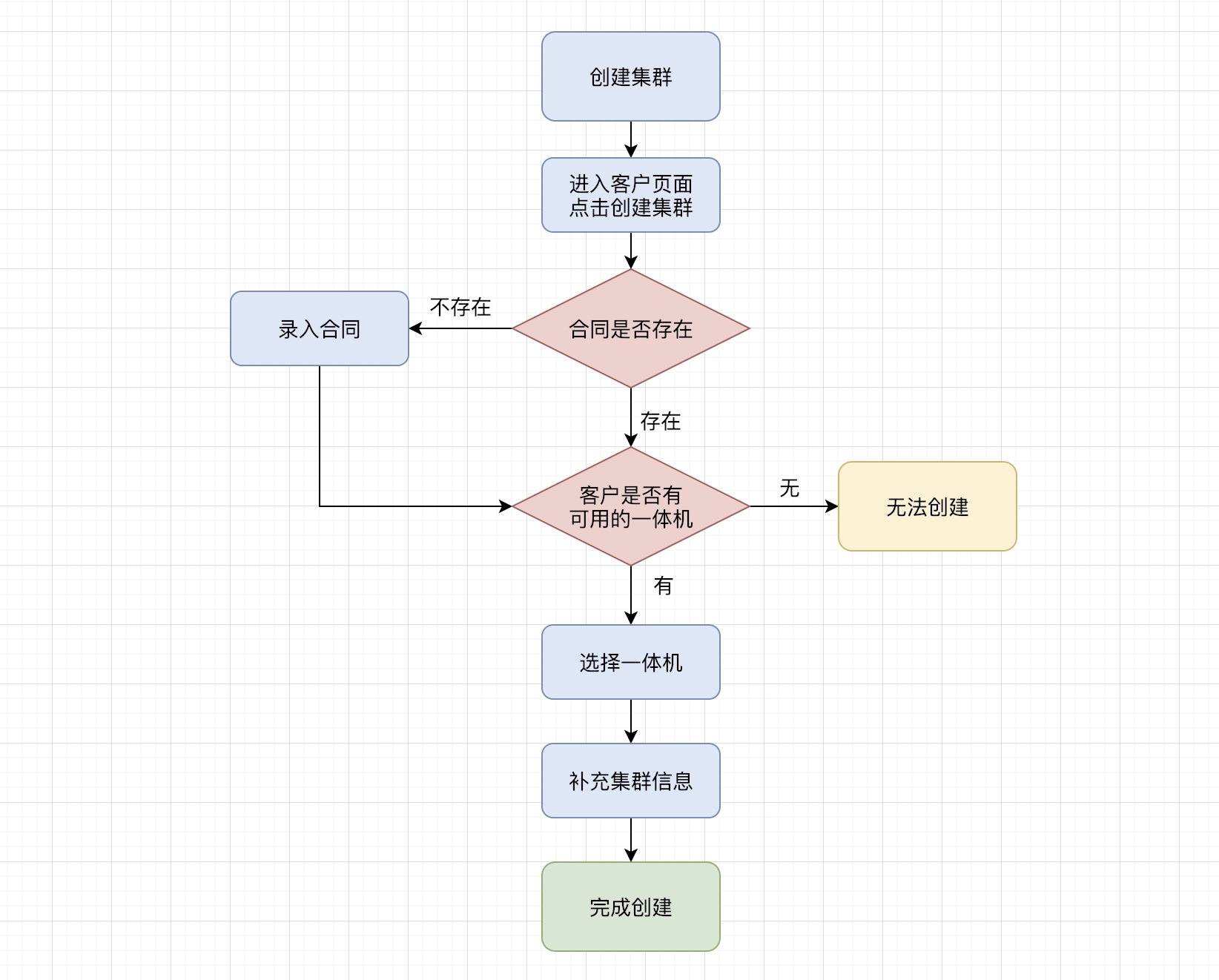
Process of adding a cluster
3. Design Exploration
After the requirements and product flow were determined, the design exploration began.
The design exploration mainly revolved around the following aspects.
- Overall style: including visual style, interactive forms, how to maintain a consistent image with the client's brand.
- Information architecture: including overall navigation, page layout, first and second page jumping relationship, etc.
- Lists: lists are the main form of displaying data in the system, so the search, filtering, adding operations and page-turning controls about lists also need to find the right form.
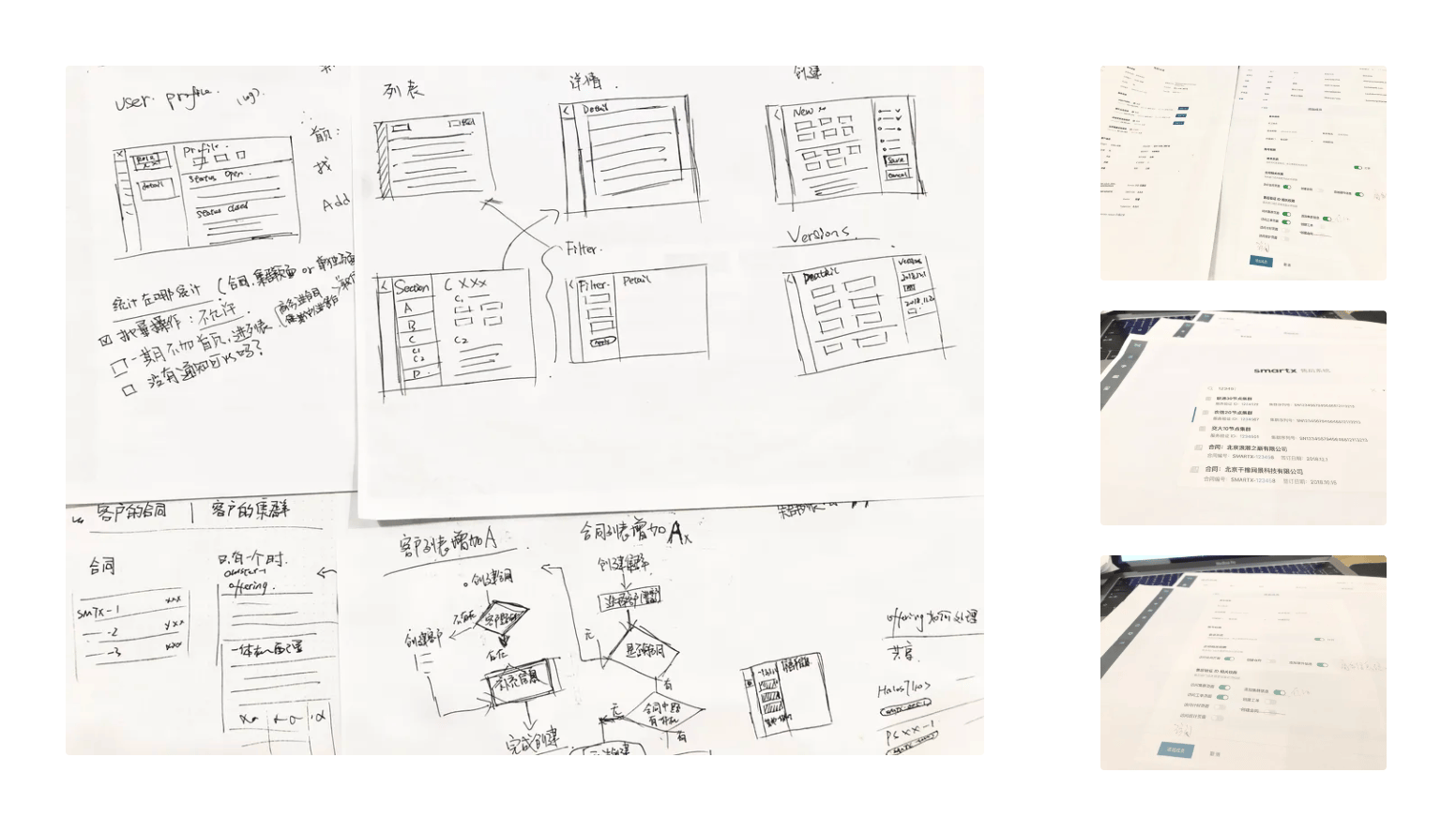
Drafts
3.1 Overall Style
After communicating with the client, the after-sales service system, as an internal corporate tool, wanted the overall style to be consistent with the brand image, while the visuals and interactions could be kept simple and clear, and could help the after-sales staff to complete their tasks better and more efficiently.
We extracted design elements from the client's website and products, such as the stylized background image of the client's website and the color palette of the client's products, and applied them to the overall visual design.
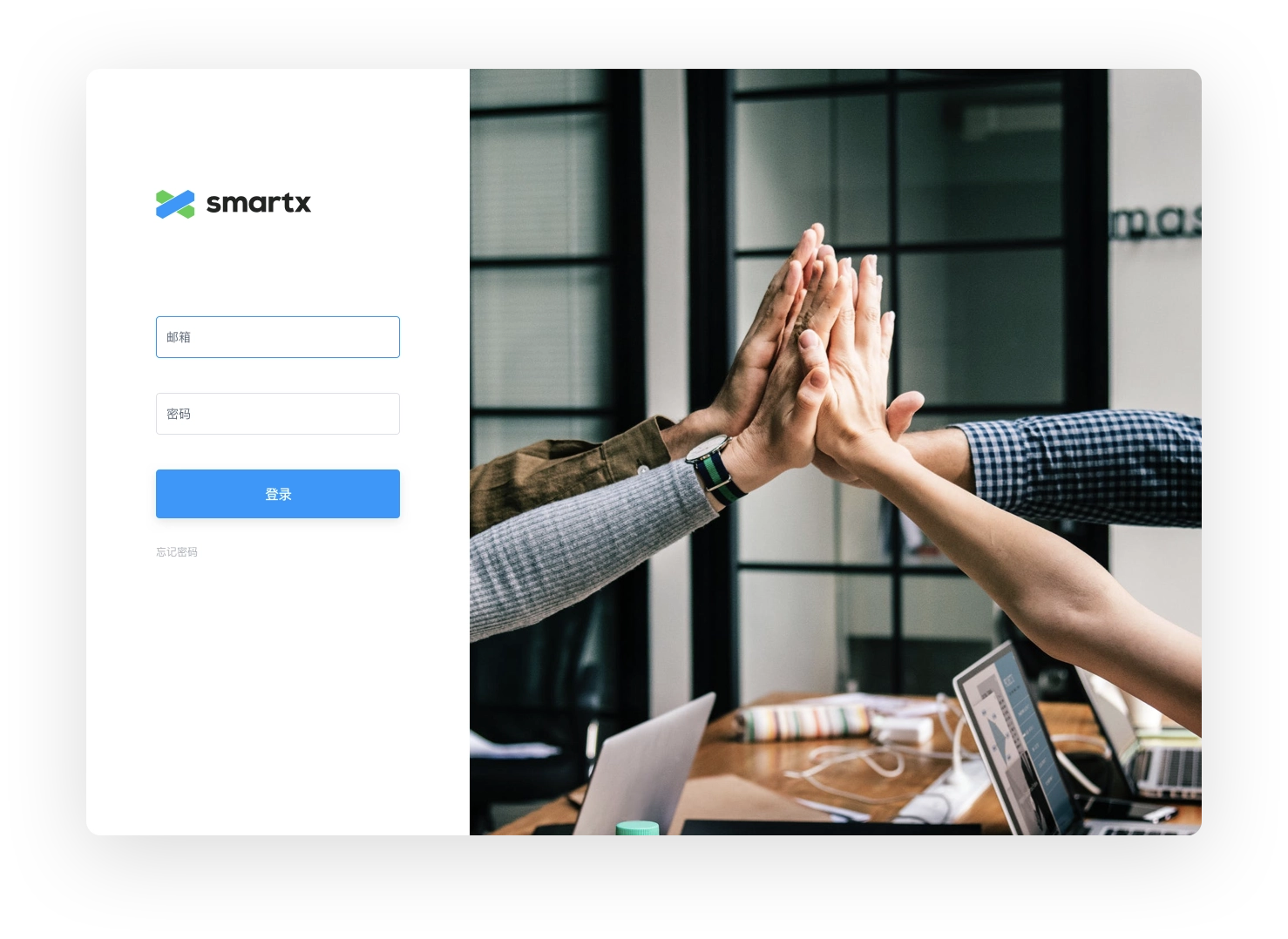
Login page design exploration
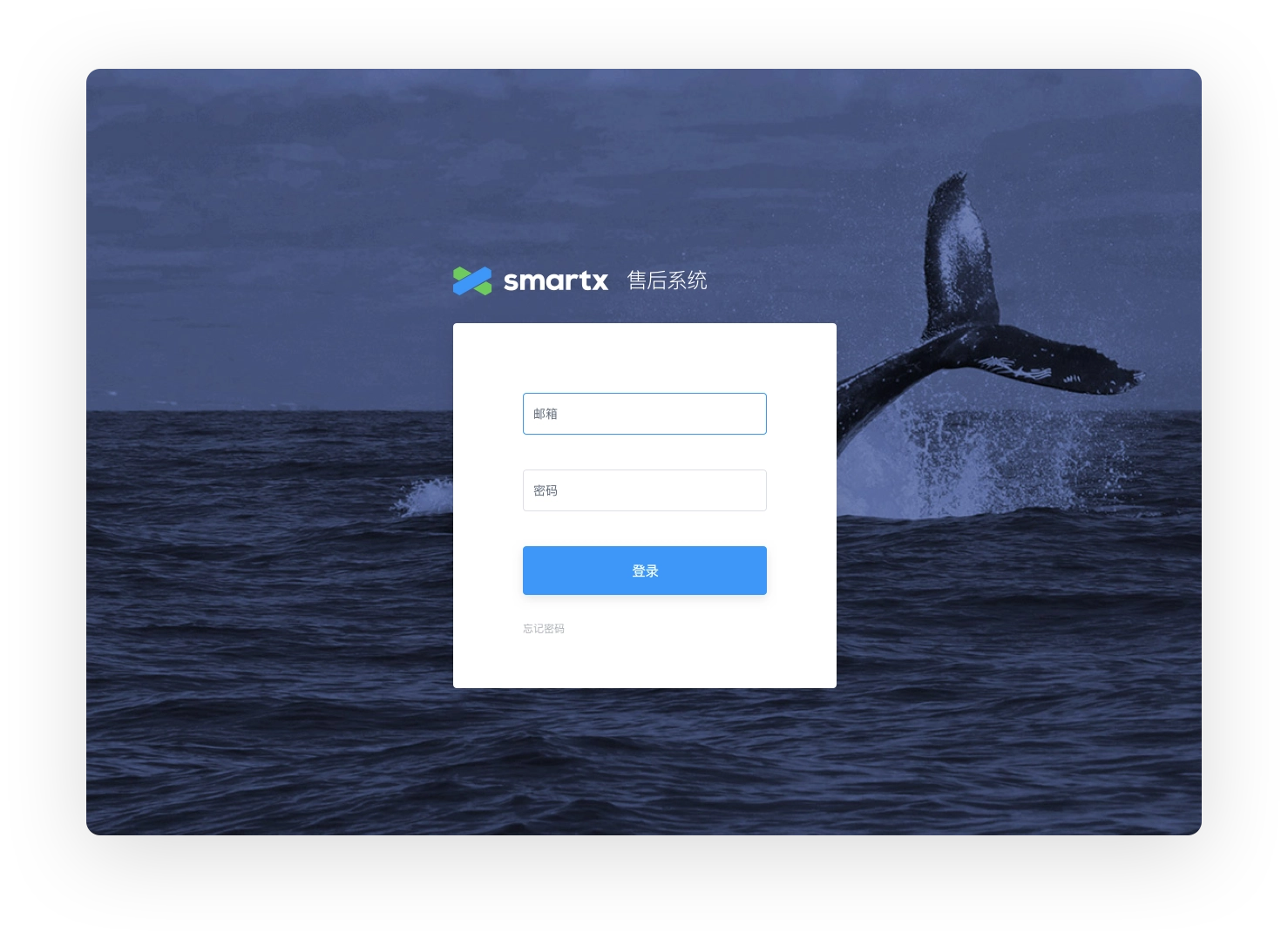
Login page design exploration, using the same style image from the client's website (final version)
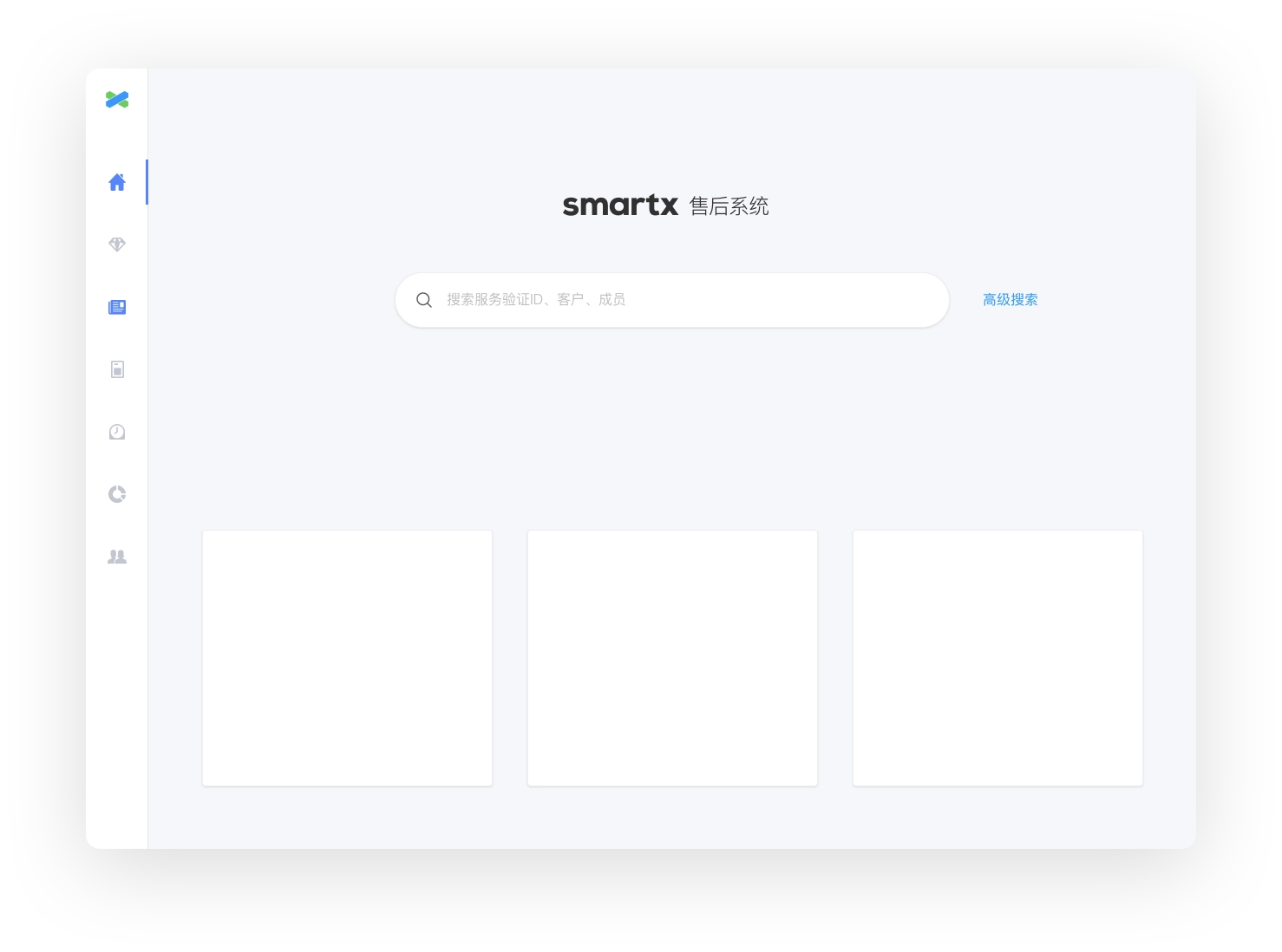
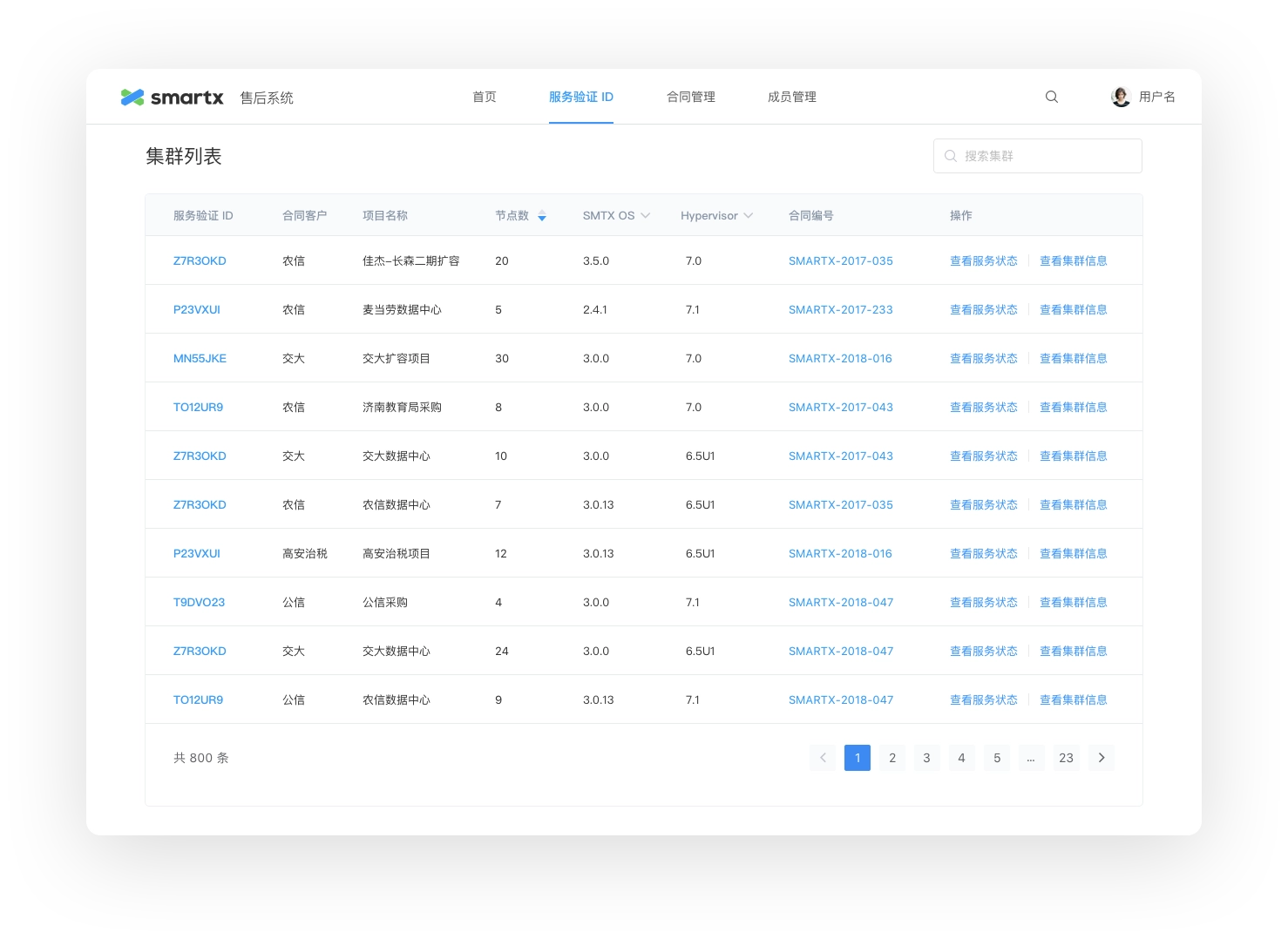
3.2 Information Architecture
The main considerations at the information architecture level were the overall navigation, page layout and the handling of logical relationships between pages at different levels. For this purpose we experimented with various layouts and discussed the future planning of the system with the client, and finally settled on a final version based on the following factors.
- Simplicity of hierarchy and ease of interaction.
- providing a consistent operating experience for users with different permissions (the amount of content they see may vary).
- meeting the client's future functional expansion needs.
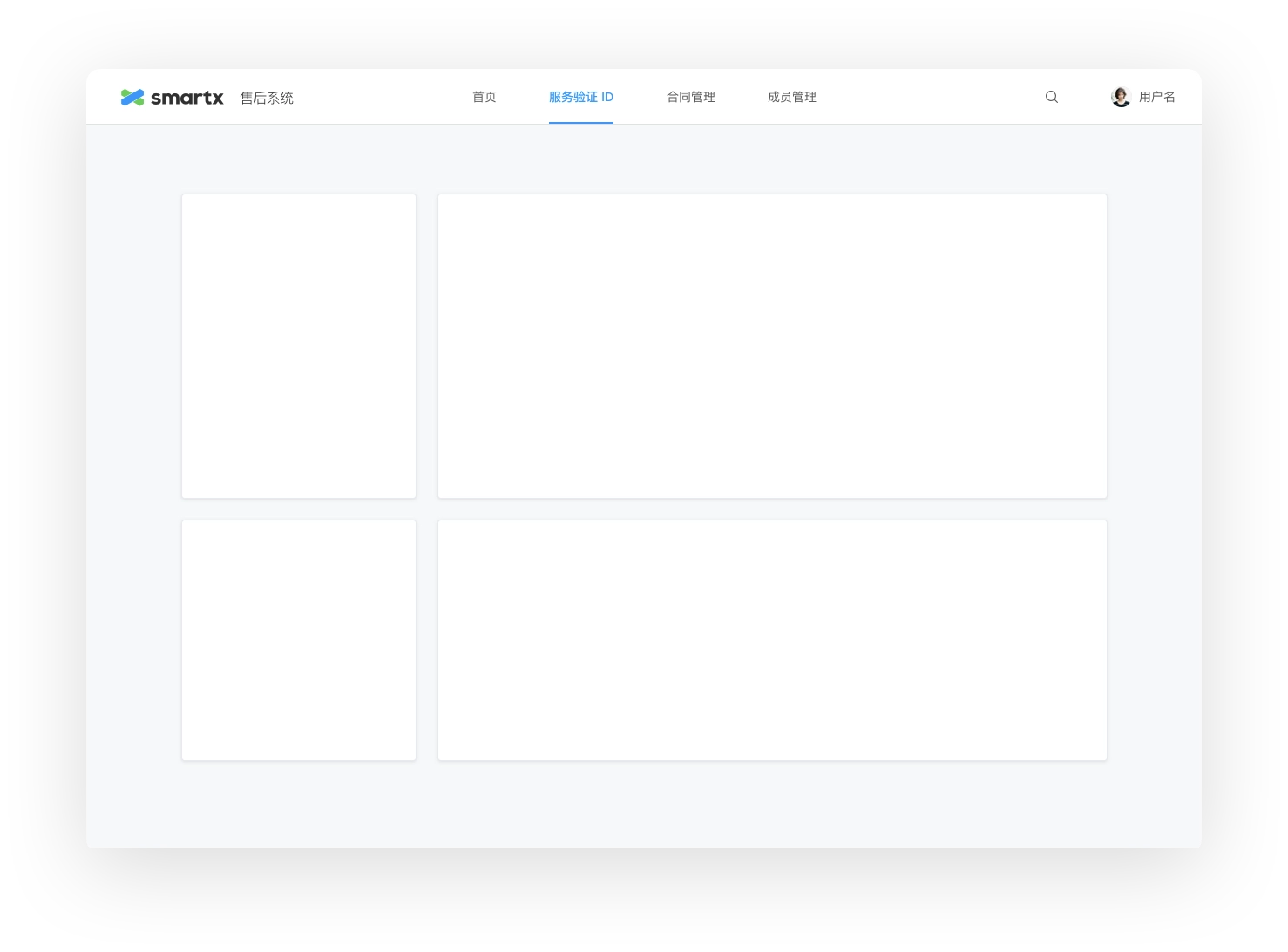
Top-down layout with functional navigation at the top
Top-down layout with functional navigation at the top
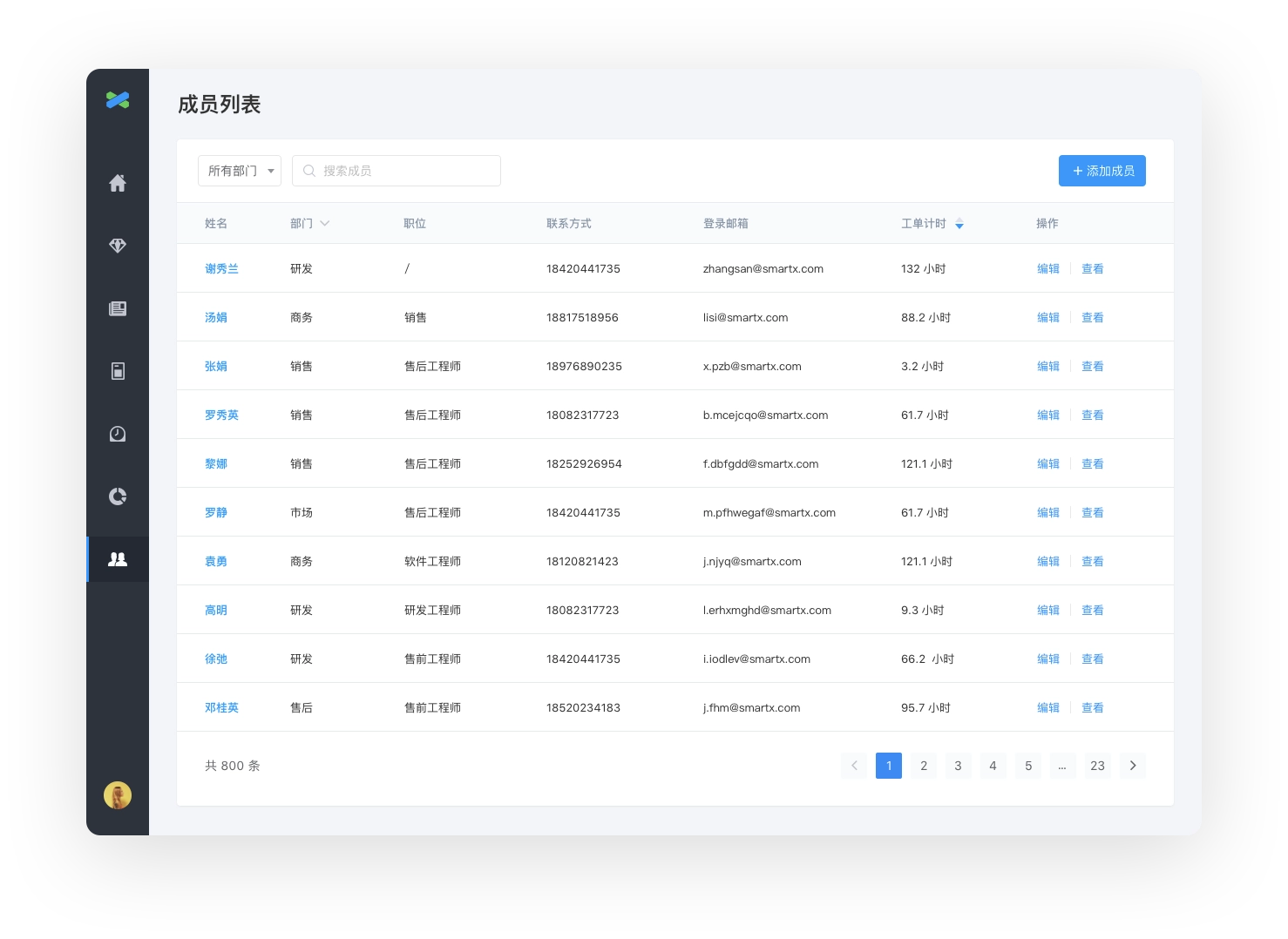
3.3 Lists
Lists are essential components for any product with large amounts of data. Although they seem simple, they actually contain a variety of components and complex interactions, such as search, filter, sort, manipulate, and page flip controls, so the components have to be customized according to actual needs.
After communicating with the client to understand the requirements for handling list data, we iterated through the final design.
List page design exploration
List page design exploration
4. Design Solution
In order to cope with the large amount of data, we have made various innovations in interaction design and visual design. We focus on their daily workflow from the experience of actual users, and optimize the details in the process through design, so that the efficiency of after-sales staff can be improved.
4.1 Form filling help
Since after-sales service relies heavily on mastering customer data and cluster data, data entry is an essential part of the system. But at the same time, the large amount of data entry operation may cause difficulties to the actual users.
For example, when entering a contract, the following information needs to be entered.
- Customer information
- Project information
- Hardware information
- Salesperson information
- Financial information
- Offering Information
- All-in-One Configuration
- ......
We have tried to make the data entry process easier through design. In addition to providing Excel import function to support importing existing contract information, we have also explored the design of forms.
Regarding the form, we mainly consider the user's filling experience, reduce the difficulty of using and the possibility of making mistakes, and improve the efficiency of filling. There are terms and terminology in the form, and usually the name field of the form cannot be explained clearly and needs additional explanation, and there are also some operations that need to be operated carefully, so we introduced the design of form filling instructions: when entering contracts and entering cluster information, the filling instructions column is added on the left side of the form to provide help instructions for filling the corresponding area and field.
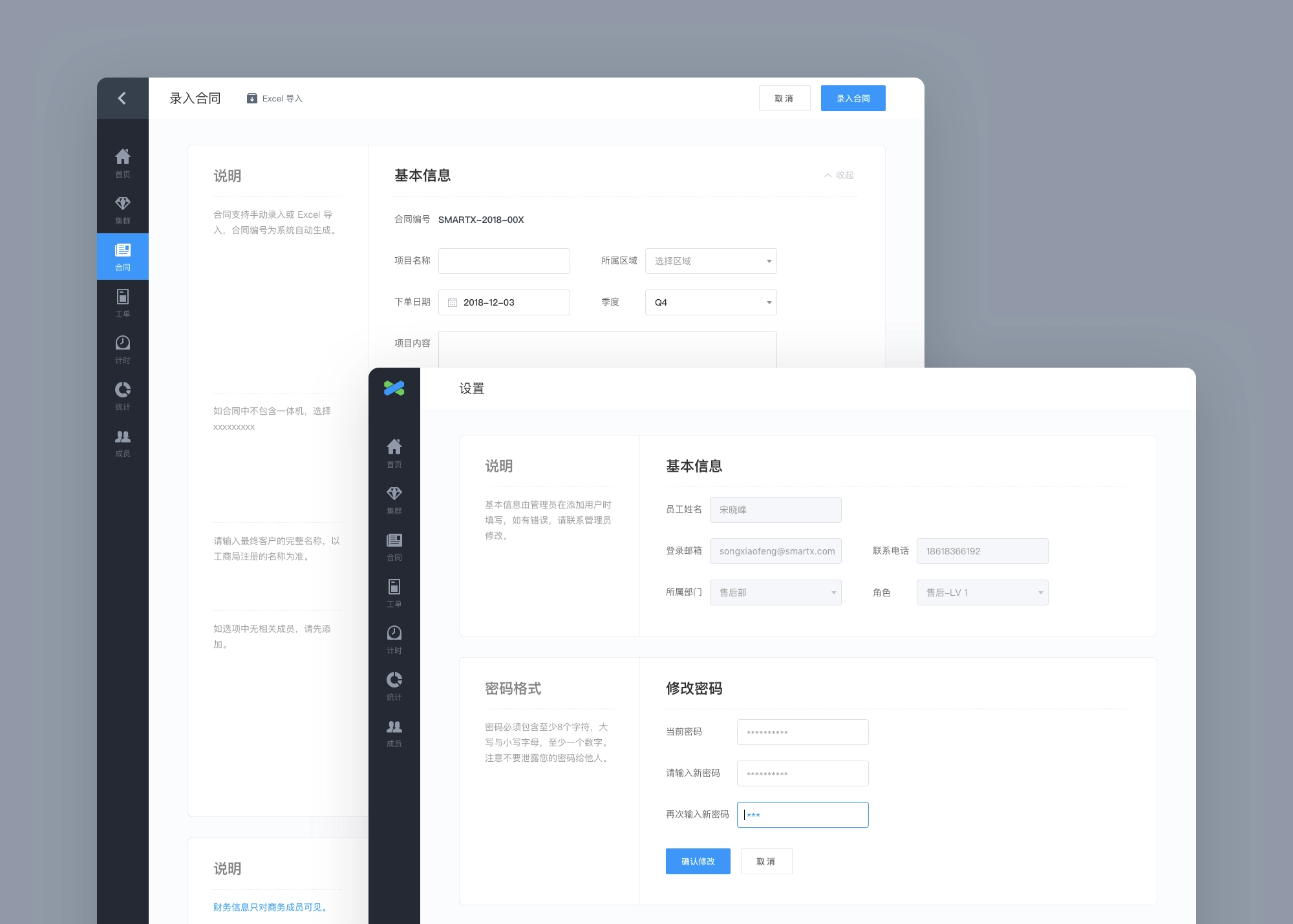
Form filling instructions displayed on the side of forms.
With this design, team members can clearly know how to fill in each field and what to pay attention to when using the form, so even new members can quickly get started and avoid the possibility of making mistakes.
In addition, we also carefully considered the appropriate default fill fields for each input box in the form to guide users to fill them according to the rules. We have added the function of collapse/expand area in the long form page with separate areas, so that you can focus on filling in a single part when modifying.
4.2 Global Search
Providing quality after-sales service to customers depends on the mastery of customer information, and in the early stage it depends on the accurate entry of various data by members. In the post-sales stage, it depends on the efficiency of data processing.
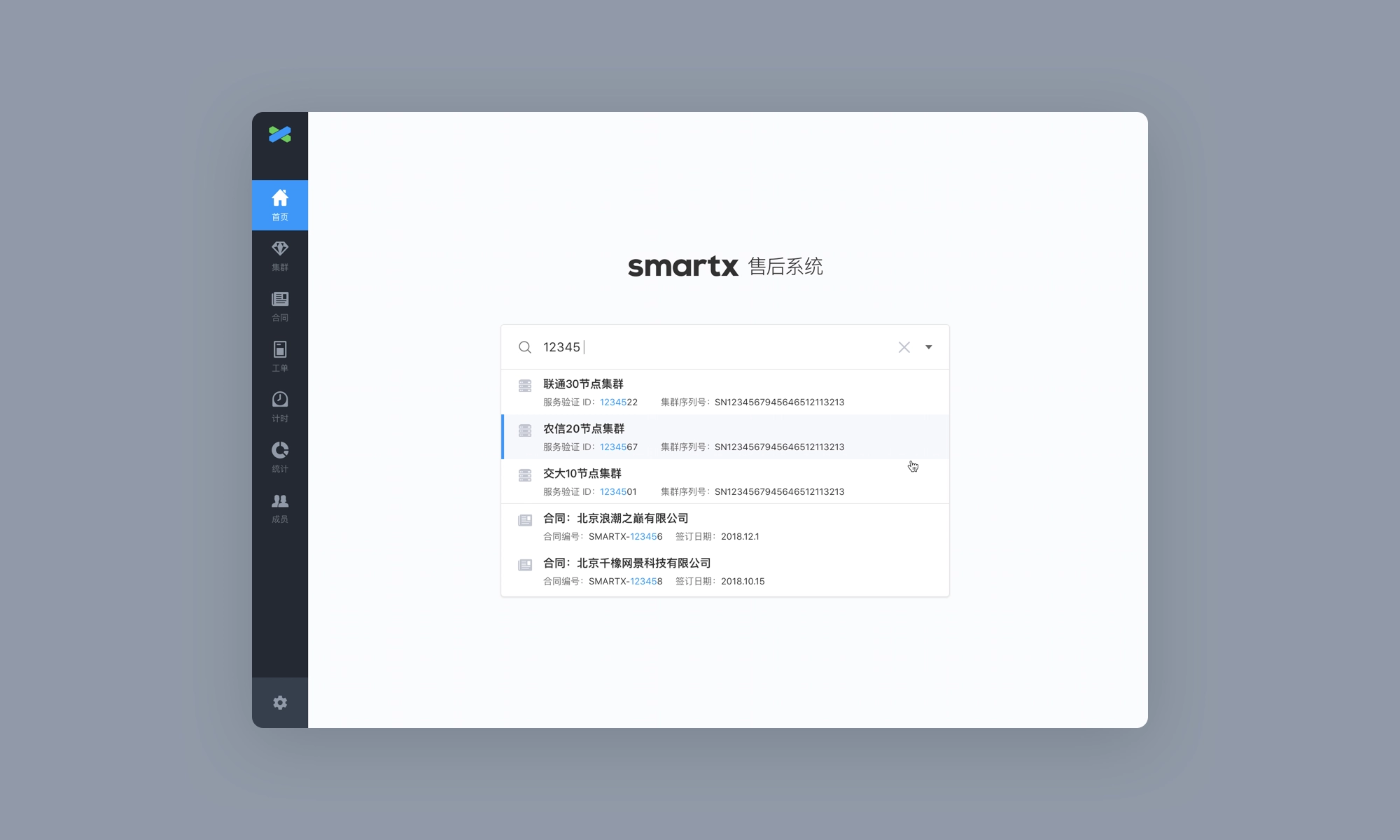
Usually when a customer encounters a problem and contacts after-sales service, the after-sales service needs to understand the customer information and hardware environment information at the first time in order to provide a targeted solution for the customer. To get complete information is based on the fragmented information provided by the customer, and the fragmented information does not necessarily have a fixed type, so a powerful global search can greatly enhance the efficiency of after-sales processing.
Global search
The search function supports fuzzy search for information on customers, contracts, clusters, work orders (Phase II) and members. When searching, simply enter the fragmented information provided by the customer into the search box to trigger an automatic contact. The relevant contract or cluster can be found before the full information is entered, and when you tap into the corresponding detail page, you can see all the information entered in the previous phase, quickly helping the customer locate the problem.
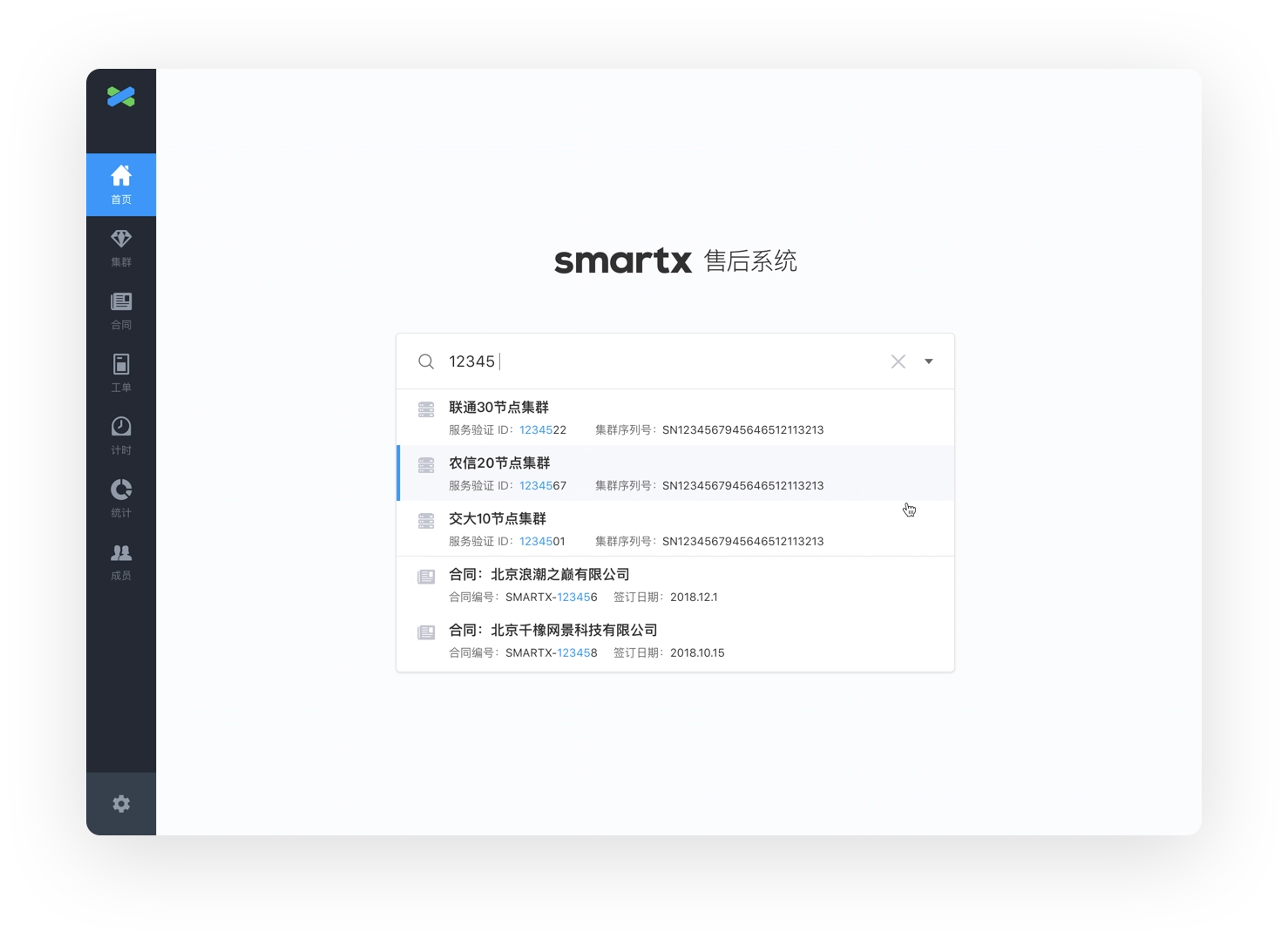
Search input auto-completion
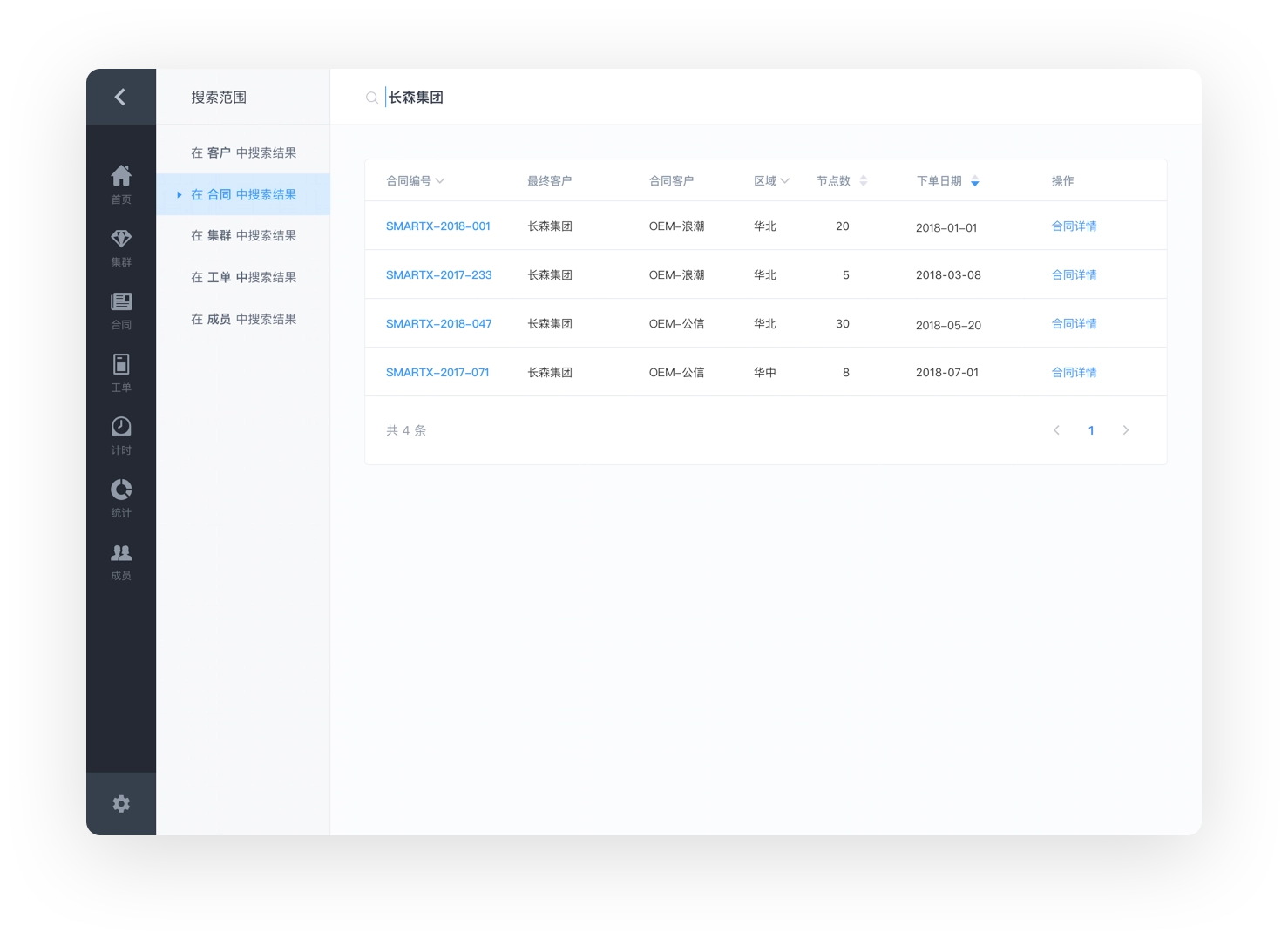
Search result selection: Contracts
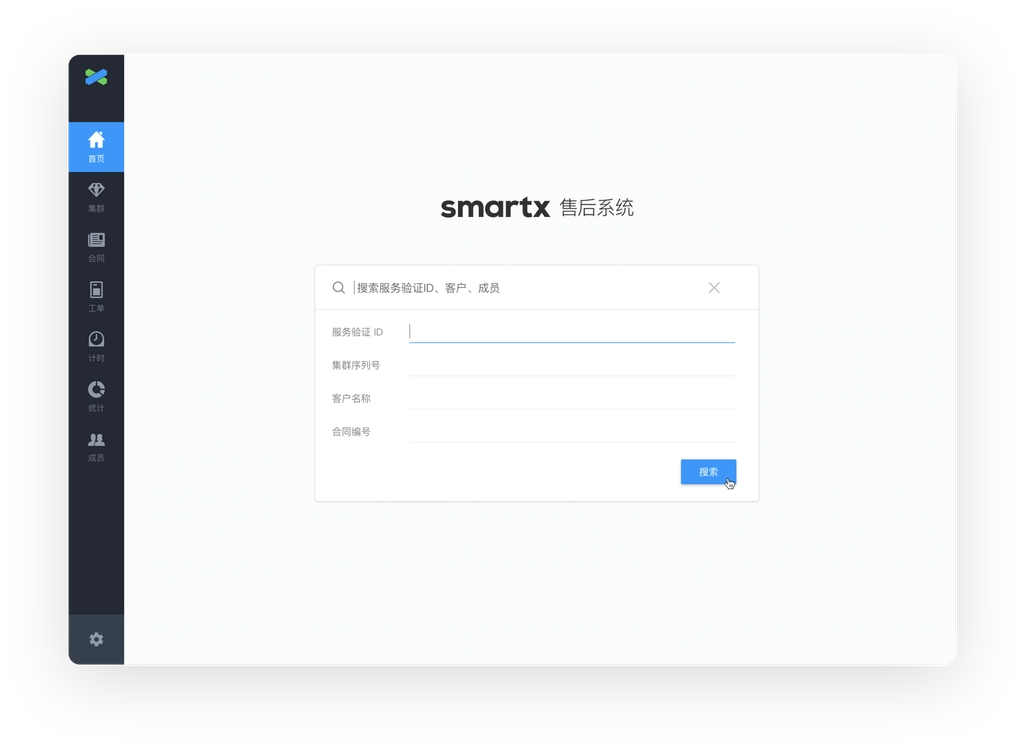
Advanced search to perform accurate searches
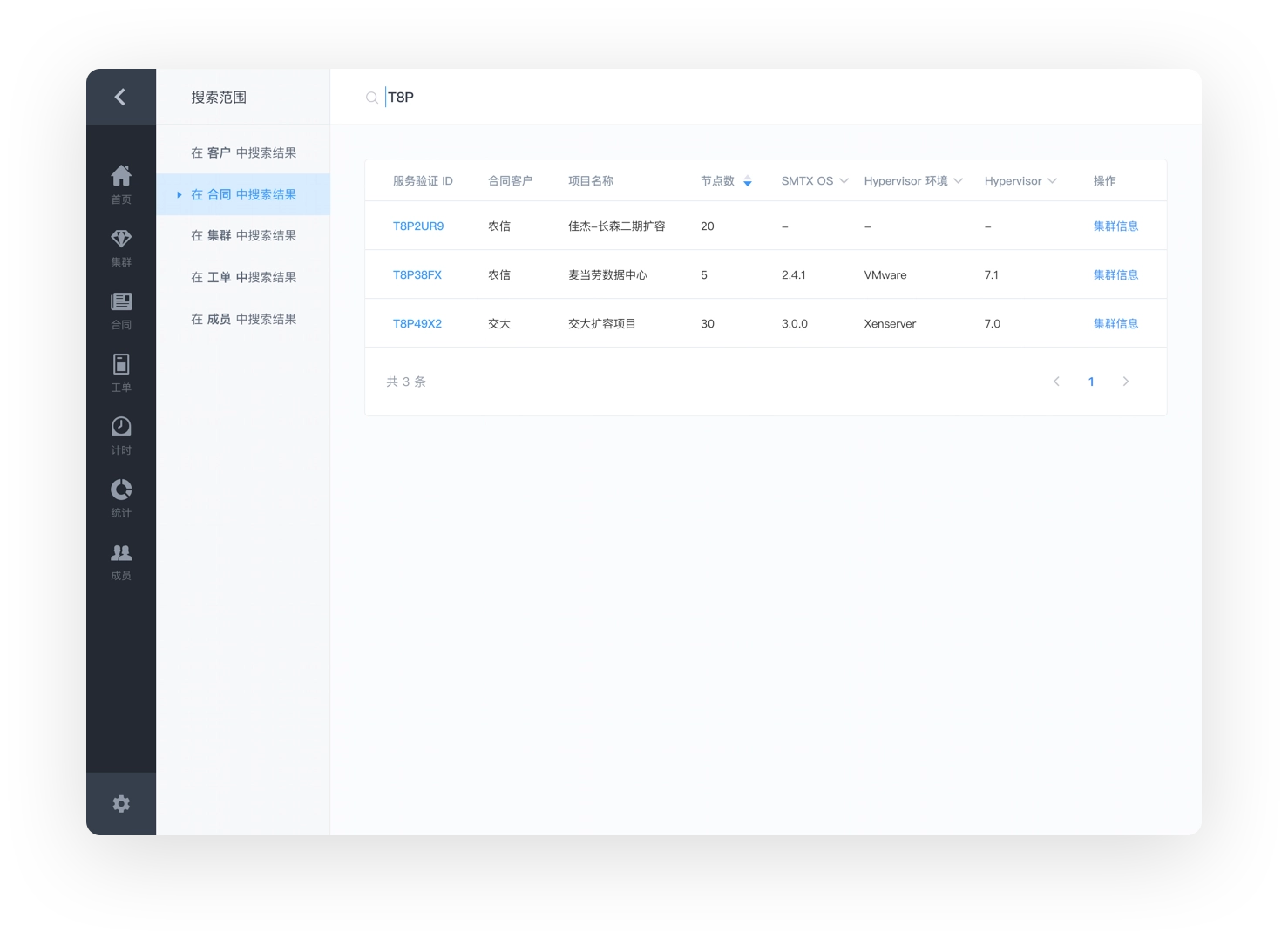
Search result selection: Cluster
4.3 Account Permission Design
The system data contains many confidential data, which are very important to the company and customers, such as customer information, contract information and cluster information. These data are managed under different departments, for example, the commercial department is responsible for entering contract data, and the after-sales engineers are responsible for entering customer cluster information ...... Different data need to strictly control the people who can access them to prevent important data from being misused or modified.
This also requires careful differentiation of permissions, so we break up the original role permissions (department member permissions) into the smallest granular operations: access permissions, add content permissions, modify content permissions, and a single department member permission is a combination of a series of operations. Permissions are no longer strictly divided according to departments. When administrators add members to select departments, permissions are selected according to the default permissions preset by the department, and flexible adjustment is also supported, so that different permissions can be assigned to members with different divisions of work within the team.
Together with the login permissions of the system itself, it constitutes the complete permission design of the system. When an employee leaves the company, the login permission can be closed.
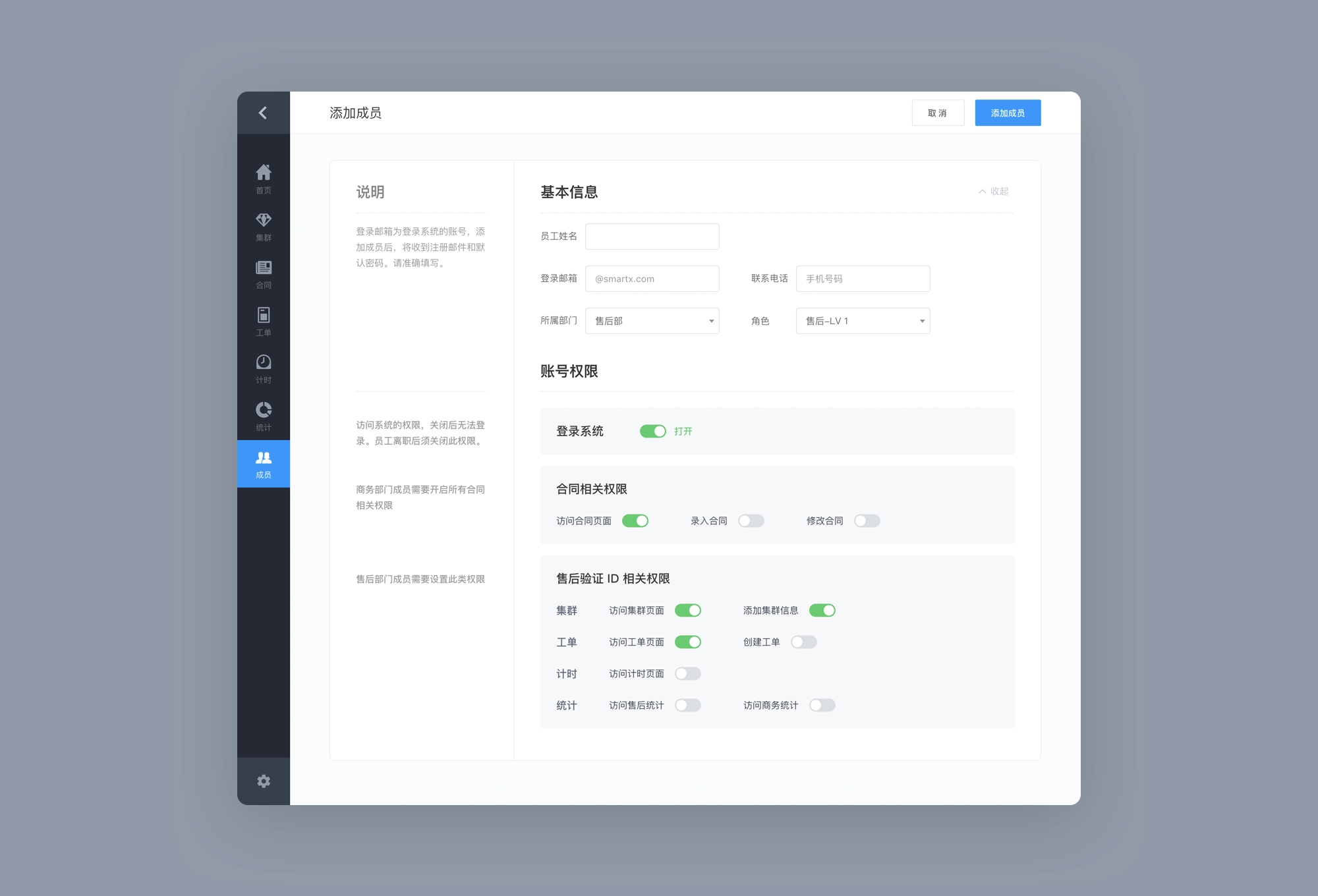
Add members
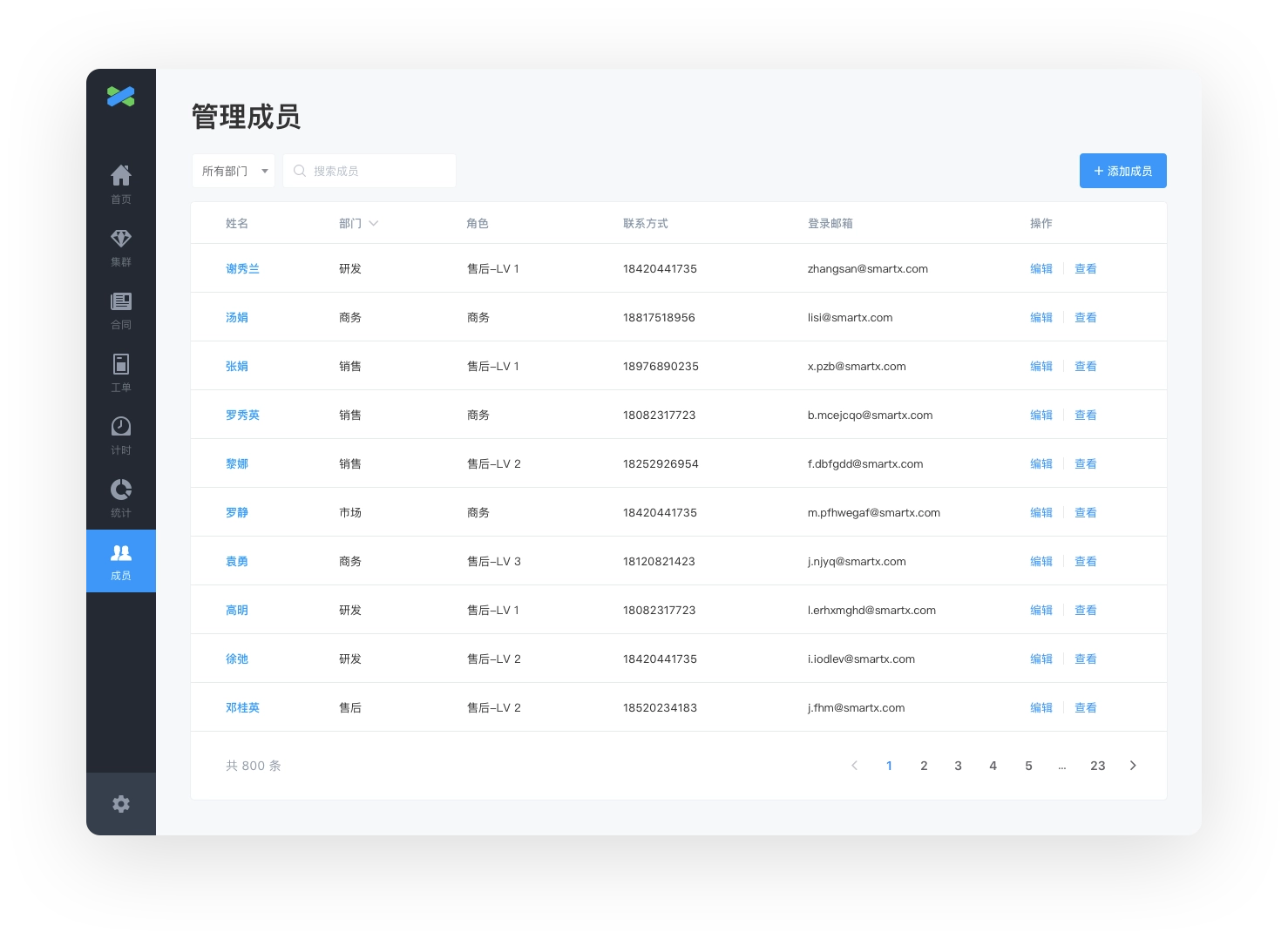
Member list (visible only to administrators)
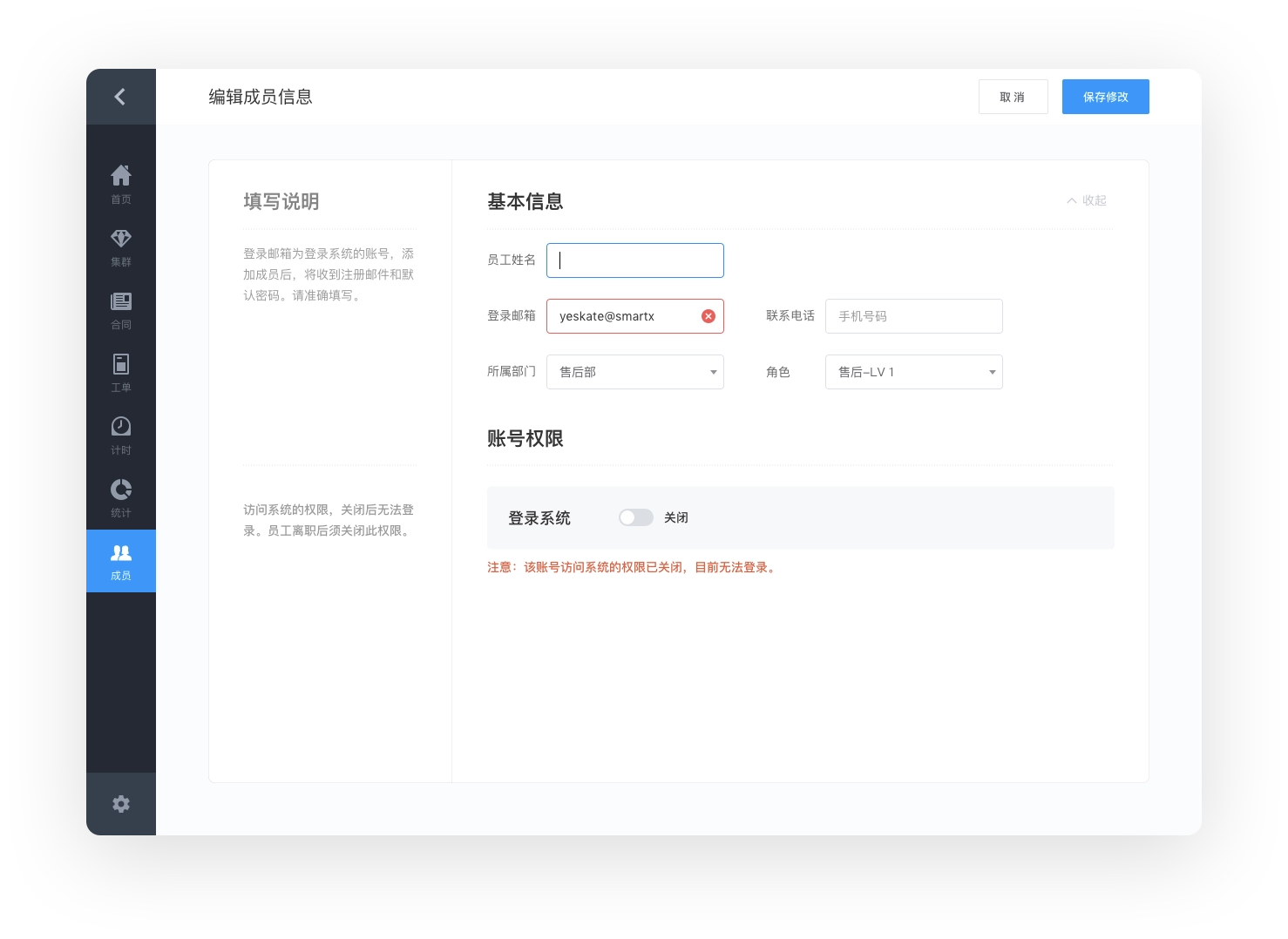
Member permission setting: Close login permission
4.4 Version History
The process of entering contract and cluster information requires the participation of several members, and even requires cross-departmental collaboration. In order to ensure the accuracy of the data, we need to record during the collaboration process and track the process of data changes; on the other hand, customer information and cluster information will keep changing over time, and also need to be updated by team members in a timely manner, we also need to record the changes of different versions.
For this reason, we added version information to the details page of contracts and clusters. Each update by the user will save a version and record the person, time and content of the modification, and the content modified in that version will be highlighted when the corresponding version name is clicked.
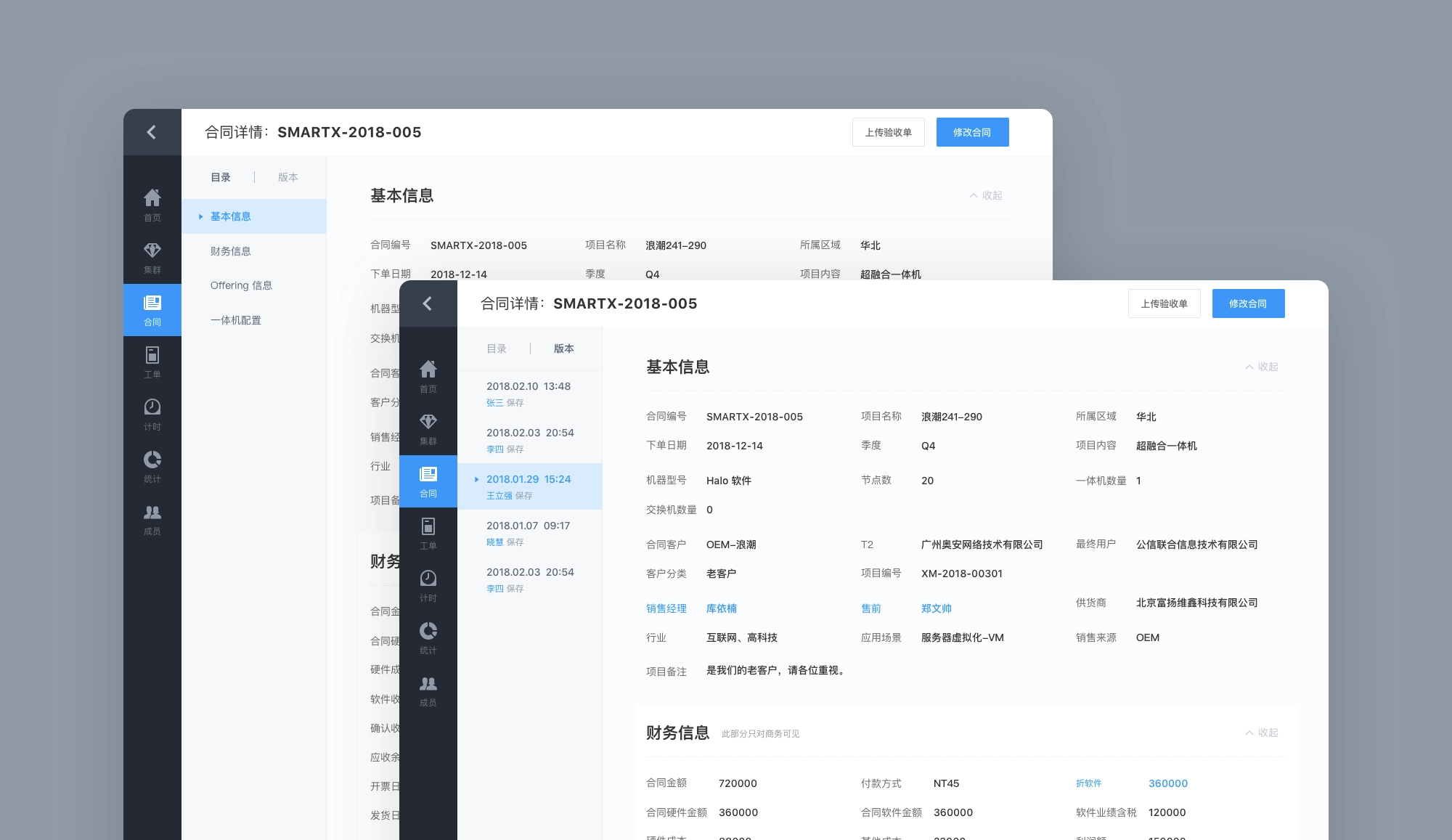
Version history
Final Design
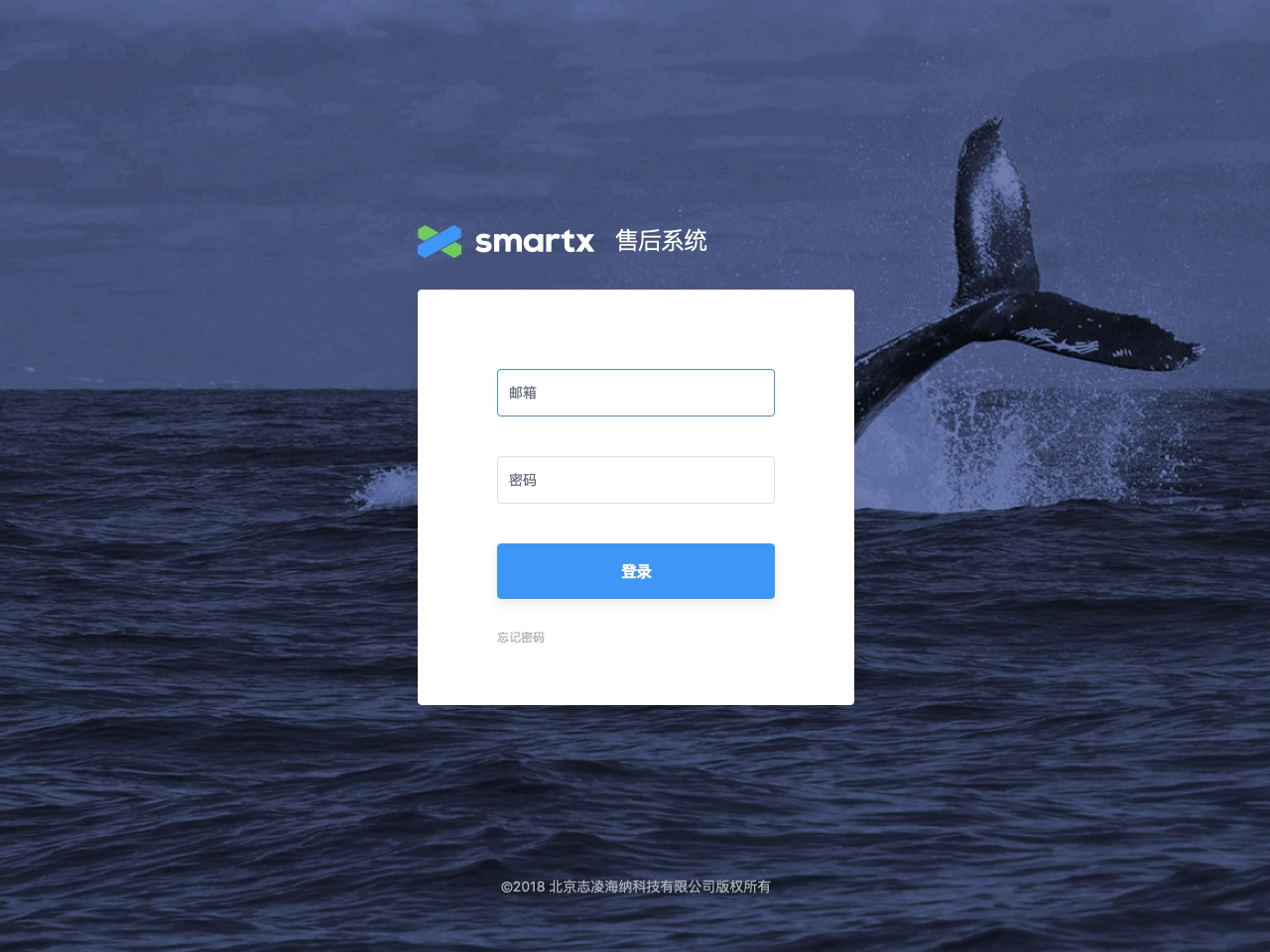
Login page
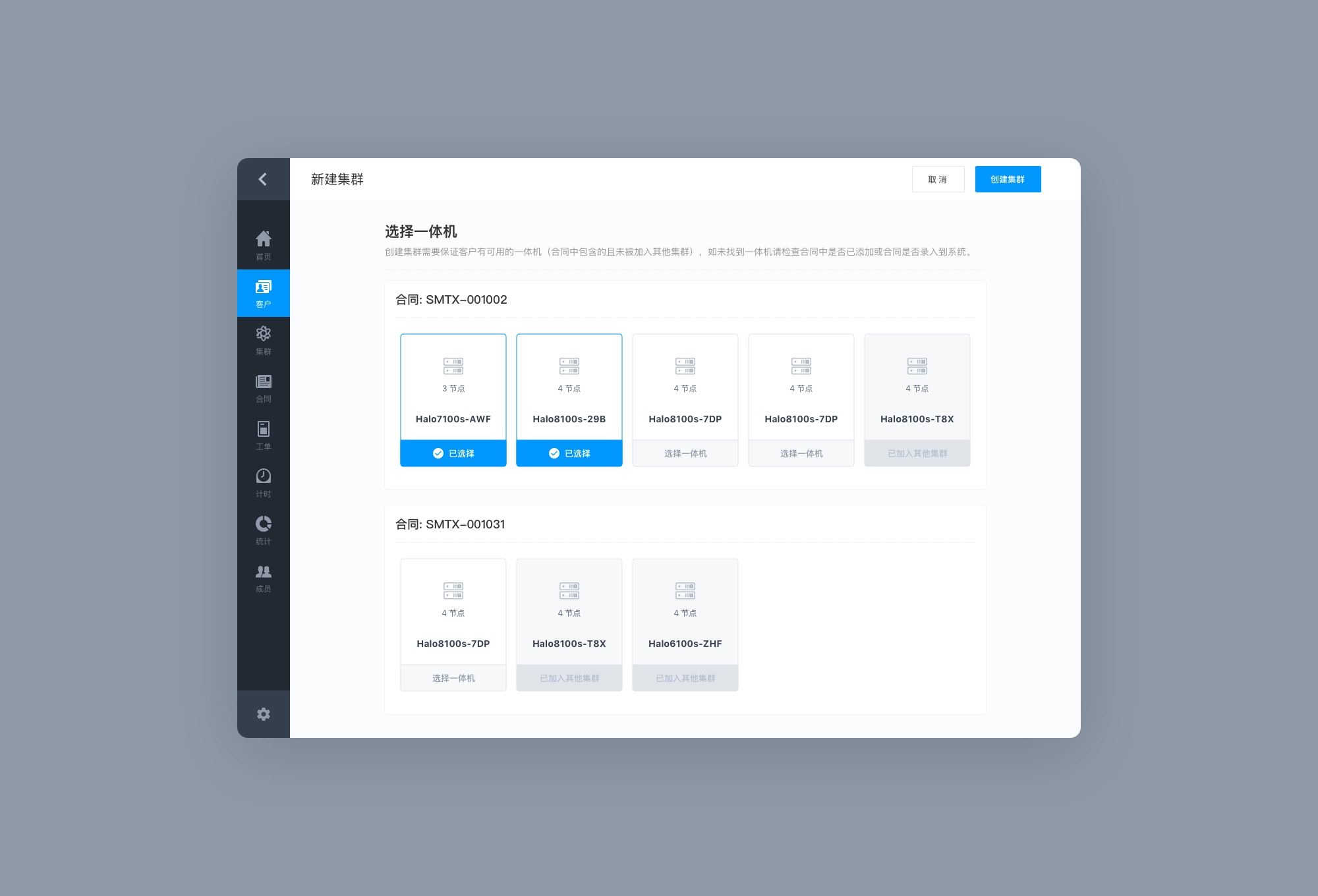
Adding new clusters page
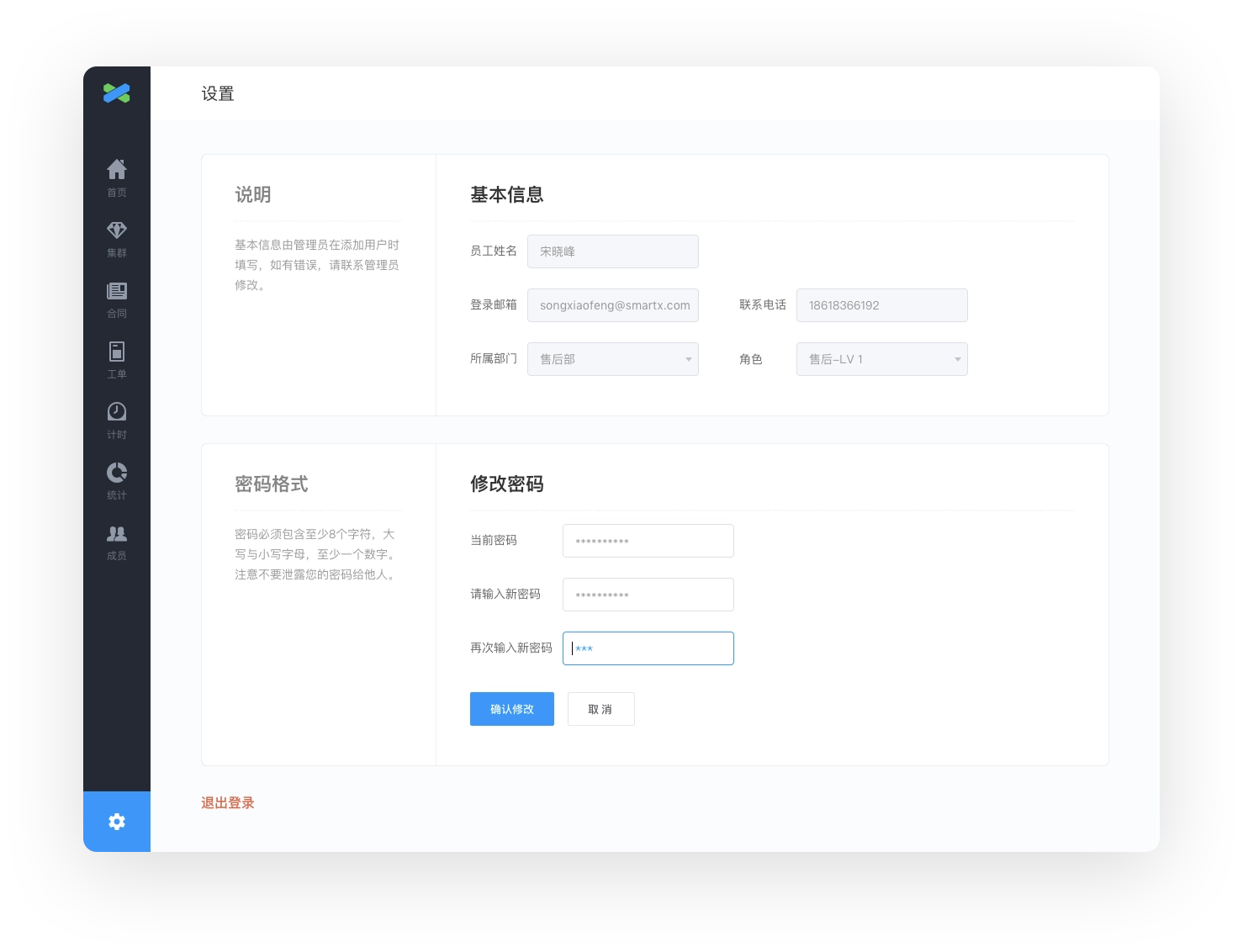
Settings page
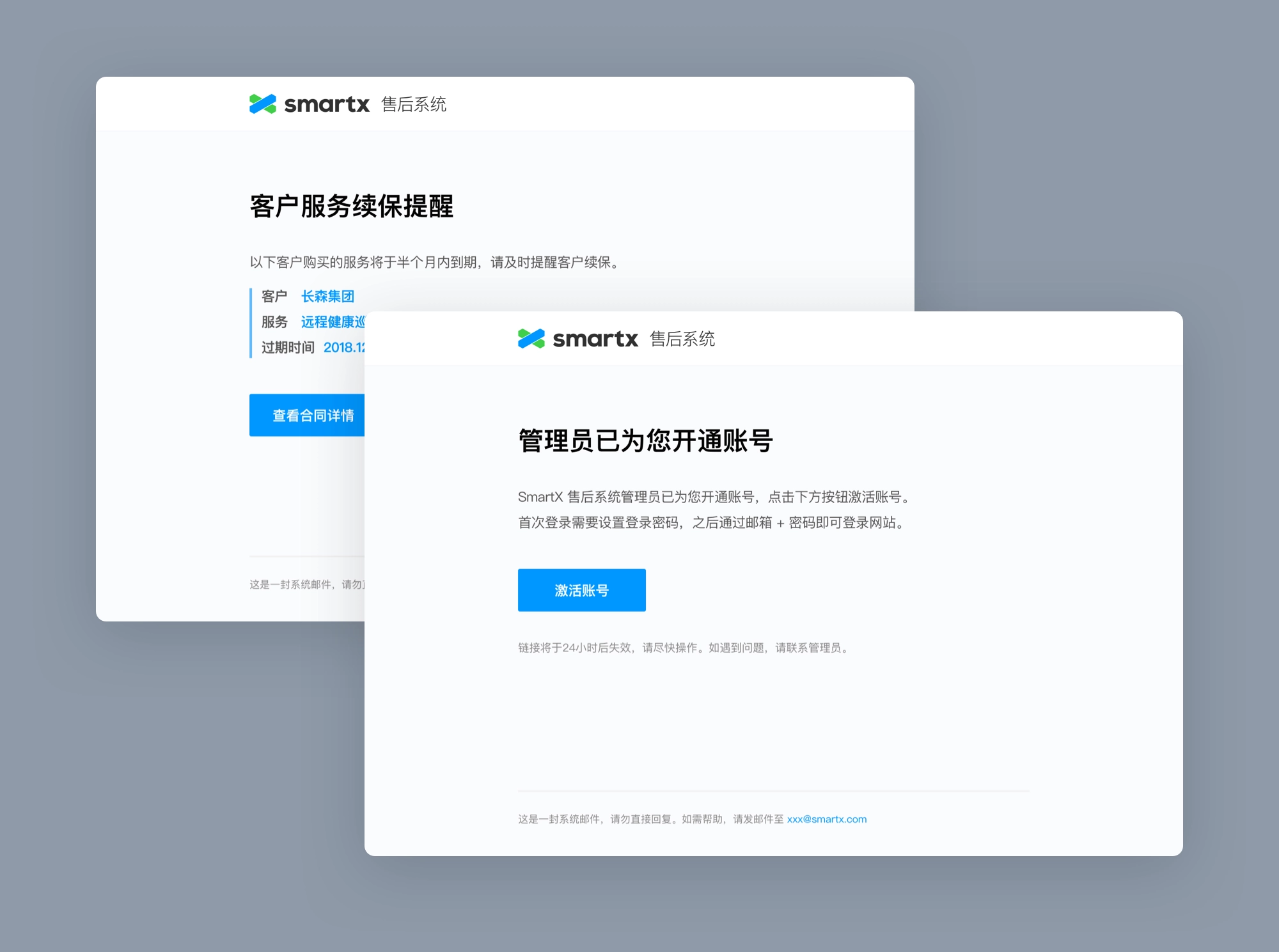
Notification emails
Thanks for watching!
Navigation


Case study
SmartX After-sales System
Designing a system with a large amount of data, complex permissions, and multiple departments involved.
role
Only designer
Platform
Web
My Contribution
UI / UX Design
Product Management
Project Management
Introduction
After-sales system is another project with SmartX after partner website. SmartX is a leading hyper-converged product and enterprise cloud solution provider in China, offering self-developed SMTX OS software and all-in-one hardware products to enterprise customers. This time, the requirement is for the after-sales department, which wants to build a system to manage customer relationship and provide after-sales service for customers.
SmartX is divided into sales, marketing, commercial and after-sales departments, and each sale to a customer requires multiple departments to complete: pre-sales engineers communicate with customers about their needs → sign contracts with customers → after-sales engineers visit the customer to implement and install the product → after-sales service.
The after-sales department relies heavily on the mastery of customer information, hardware environment and cluster information to locate problems and provide solutions based on these information when providing after-sales services to customers. Since each process is under the responsibility of different departments, there will be delays in synchronizing information between departments, and the after-sales department only starts to participate in the late stage of the process, so it often cannot grasp the complete information, which makes it more difficult to locate the problem, and the efficiency and satisfaction of after-sales service is difficult to be guaranteed.
Therefore, we want to build a system that can be used by colleagues from sales, commercial and after-sales departments together, covering the entire after-sales process from customer signing, recording sales contracts, entering customer information, generating after-sales service numbers, installing and supplementing actual customer cluster information at home, and checking the warranty period of products purchased by customers.
The Goal is to achieve:
- Generation of a UUID service code for the customer at the time of contract signing.
- Entry of customer information and contract information by the commercial department, including the number of software and hardware purchased.
- Automatic calculation by the system of the after-sales service period according to the customer's purchase time (the service period varies for different devices).
- When a customer encounters a problem and contacts the after-sales department, by providing the service verification code, the after-sales department can obtain customer information, hardware information, cluster information, etc. to quickly locate the problem.

Design Challenge
System with large amount of data, complex permissions, and multi-department involvement.
- Heavy data
Contract data, customer information, cluster information, each of which used to be maintained by multiple tables, now we need to add all these data into the system. This also means that we have to deal with a large amount of data and forms. How can we ensure the experience when entering and maintaining them, and reduce the possibility of errors?
Clients’ data were maintained in multiple tables.
2. Complex inter-departmental permissions
The software and hardware procured in a contract can be used to create one cluster, or multiple clusters may be created. In turn, equipment purchased multiple times by users may be used for the same cluster expansion. Therefore the association between contracts and clusters needs to be designed flexibly to ensure the integrity and timeliness of customer data.
3. Mutual coupling of resources
The system will be used by colleagues in sales, commercial and after-sales departments together, and members of each department have corresponding responsibilities, which correspond to different operation rights in the system, and account system and member rights need to be carefully considered.
The relationship between contracts and clusters.
Design Process
1. User Interviews: Identifying Problems
The main users of the after-sales service system involve members of several departments in commerce and after-sales, so it is important to understand their daily workflow. Before the project started, we interviewed the actual users of the product (after-sales, commercial department members, after-sales person in charge) to understand these issues.
- The current division of responsibilities and workflow of each department.
- How the departments communicate and collaborate with each other.
- The common types of contracts signed with customers.
- What common problems customers encounter.
- The process of handling problems in the after-sales department.
After 3~4 rounds of in-person communication, we have an overall understanding of the obstacles that the after-sales department will encounter in practice, and the main problems that exist are.
1.1 Lack of unique traceable service verification number for sold goods
Software or hardware sold to customers, the lack of a unique traceable service verification number. On the one hand, for companies, it is difficult for the after-sales department to track which devices customers have purchased, lacking a complete record of customer information and customer environment, and having to rely on after-sales engineers to visit and check; on the other hand, for customers, the lack of a unique number means that when they encounter problems contacting after-sales, they cannot prepare a description of the faulty device, increasing the difficulty of locating the problem.
1.2 Information barriers exist between departments
Providing a good after-sales service experience for customers relies on having complete information. Although there is a clear division of work responsibilities between departments, the mastery of customer information is scattered across departments, for example, customer information and contract information is obtained when the commercial department signs a contract with the customer, and customer cluster information is obtained when the after-sales staff comes to the house to implement the installation. In addition, the information synchronization between departments is not timely, which also affects the experience of after-sales service.
1.3 Lack of systematic management platform
In the past, contract and customer information was more often saved in Excel or Google Docs, and relied on manual control of visibility. For example, when the after-sales department needed customer or contract information, the commercial staff shared the forms or online documents with them, which was inefficient and prone to errors due to versions.
2. Requirements organization: clarify the product process
After understanding the existing workflow and problems of each department, we started to organize the requirements.
Firstly, after communicating with the client, we divided the project into 2 phases, phase 1 mainly included the basic construction of the platform and the cluster service verification function; phase 2 added advanced functions such as work order system, after-sales timing and statistical analysis on the basis of phase 1.
Then we started to work on the specific implementation details of Phase I. After the previous project SmartX partner website was built from scratch, we had more mature design ideas on the basic functions of account system, permission design and notification system, so this phase is more The output of this phase is the project requirement document containing the implementation details and the summary of the pages that need to be designed.
Based on the results of the interviews in the previous step, we organized the work responsibilities of the customer, business team and after-sales team in the system into a flow chart.
Contract Management Flowchart
Process of adding a contract
Process of adding a cluster
3. Design Exploration
After the requirements and product flow were determined, the design exploration began.
The design exploration mainly revolved around the following aspects.
- Overall style: including visual style, interactive forms, how to maintain a consistent image with the client's brand.
- Information architecture: including overall navigation, page layout, first and second page jumping relationship, etc.
- Lists: lists are the main form of displaying data in the system, so the search, filtering, adding operations and page-turning controls about lists also need to find the right form.
Drafts
3.1 Overall Style
After communicating with the client, the after-sales service system, as an internal corporate tool, wanted the overall style to be consistent with the brand image, while the visuals and interactions could be kept simple and clear, and could help the after-sales staff to complete their tasks better and more efficiently.
We extracted design elements from the client's website and products, such as the stylized background image of the client's website and the color palette of the client's products, and applied them to the overall visual design.
Login page design exploration
Login page design exploration, using the same style image from the client's website (final version)
3.2 Information Architecture
The main considerations at the information architecture level were the overall navigation, page layout and the handling of logical relationships between pages at different levels. For this purpose we experimented with various layouts and discussed the future planning of the system with the client, and finally settled on a final version based on the following factors.
- Simplicity of hierarchy and ease of interaction.
- providing a consistent operating experience for users with different permissions (the amount of content they see may vary).
- meeting the client's future functional expansion needs.
Top-down layout with functional navigation at the top
Top-down layout with functional navigation at the top
3.3 Lists
Lists are essential components for any product with large amounts of data. Although they seem simple, they actually contain a variety of components and complex interactions, such as search, filter, sort, manipulate, and page flip controls, so the components have to be customized according to actual needs.
After communicating with the client to understand the requirements for handling list data, we iterated through the final design.
List page design exploration
List page design exploration
4. Design Solution
In order to cope with the large amount of data, we have made various innovations in interaction design and visual design. We focus on their daily workflow from the experience of actual users, and optimize the details in the process through design, so that the efficiency of after-sales staff can be improved.
4.1 Form filling help
Since after-sales service relies heavily on mastering customer data and cluster data, data entry is an essential part of the system. But at the same time, the large amount of data entry operation may cause difficulties to the actual users.
For example, when entering a contract, the following information needs to be entered.
- Customer information
- Project information
- Hardware information
- Salesperson information
- Financial information
- Offering Information
- All-in-One Configuration
- ......
We have tried to make the data entry process easier through design. In addition to providing Excel import function to support importing existing contract information, we have also explored the design of forms.
Regarding the form, we mainly consider the user's filling experience, reduce the difficulty of using and the possibility of making mistakes, and improve the efficiency of filling. There are terms and terminology in the form, and usually the name field of the form cannot be explained clearly and needs additional explanation, and there are also some operations that need to be operated carefully, so we introduced the design of form filling instructions: when entering contracts and entering cluster information, the filling instructions column is added on the left side of the form to provide help instructions for filling the corresponding area and field.
Form filling instructions displayed on the side of forms.
With this design, team members can clearly know how to fill in each field and what to pay attention to when using the form, so even new members can quickly get started and avoid the possibility of making mistakes.
In addition, we also carefully considered the appropriate default fill fields for each input box in the form to guide users to fill them according to the rules. We have added the function of collapse/expand area in the long form page with separate areas, so that you can focus on filling in a single part when modifying.
4.2 Global Search
Providing quality after-sales service to customers depends on the mastery of customer information, and in the early stage it depends on the accurate entry of various data by members. In the post-sales stage, it depends on the efficiency of data processing.
Usually when a customer encounters a problem and contacts after-sales service, the after-sales service needs to understand the customer information and hardware environment information at the first time in order to provide a targeted solution for the customer. To get complete information is based on the fragmented information provided by the customer, and the fragmented information does not necessarily have a fixed type, so a powerful global search can greatly enhance the efficiency of after-sales processing.
Global search
The search function supports fuzzy search for information on customers, contracts, clusters, work orders (Phase II) and members. When searching, simply enter the fragmented information provided by the customer into the search box to trigger an automatic contact. The relevant contract or cluster can be found before the full information is entered, and when you tap into the corresponding detail page, you can see all the information entered in the previous phase, quickly helping the customer locate the problem.
Search input auto-completion
Search result selection: Contracts
Advanced search to perform accurate searches
Search result selection: Cluster
4.3 Account Permission Design
The system data contains many confidential data, which are very important to the company and customers, such as customer information, contract information and cluster information. These data are managed under different departments, for example, the commercial department is responsible for entering contract data, and the after-sales engineers are responsible for entering customer cluster information ...... Different data need to strictly control the people who can access them to prevent important data from being misused or modified.
This also requires careful differentiation of permissions, so we break up the original role permissions (department member permissions) into the smallest granular operations: access permissions, add content permissions, modify content permissions, and a single department member permission is a combination of a series of operations. Permissions are no longer strictly divided according to departments. When administrators add members to select departments, permissions are selected according to the default permissions preset by the department, and flexible adjustment is also supported, so that different permissions can be assigned to members with different divisions of work within the team.
Together with the login permissions of the system itself, it constitutes the complete permission design of the system. When an employee leaves the company, the login permission can be closed.
Add members
Member list (visible only to administrators)
Member permission setting: Close login permission
4.4 Version History
The process of entering contract and cluster information requires the participation of several members, and even requires cross-departmental collaboration. In order to ensure the accuracy of the data, we need to record during the collaboration process and track the process of data changes; on the other hand, customer information and cluster information will keep changing over time, and also need to be updated by team members in a timely manner, we also need to record the changes of different versions.
For this reason, we added version information to the details page of contracts and clusters. Each update by the user will save a version and record the person, time and content of the modification, and the content modified in that version will be highlighted when the corresponding version name is clicked.
Version history
Final Design
Login page
Adding new clusters page
Settings page
Notification emails
Thanks for watching!
Navigation


Case study
SmartX After-sales System
Designing a system with a large amount of data, complex permissions, and multiple departments involved.
role
Only designer
Platform
Web
My Contribution
UI / UX Design
Product Management
Project Management
Introduction
After-sales system is another project with SmartX after partner website. SmartX is a leading hyper-converged product and enterprise cloud solution provider in China, offering self-developed SMTX OS software and all-in-one hardware products to enterprise customers. This time, the requirement is for the after-sales department, which wants to build a system to manage customer relationship and provide after-sales service for customers.
SmartX is divided into sales, marketing, commercial and after-sales departments, and each sale to a customer requires multiple departments to complete: pre-sales engineers communicate with customers about their needs → sign contracts with customers → after-sales engineers visit the customer to implement and install the product → after-sales service.
The after-sales department relies heavily on the mastery of customer information, hardware environment and cluster information to locate problems and provide solutions based on these information when providing after-sales services to customers. Since each process is under the responsibility of different departments, there will be delays in synchronizing information between departments, and the after-sales department only starts to participate in the late stage of the process, so it often cannot grasp the complete information, which makes it more difficult to locate the problem, and the efficiency and satisfaction of after-sales service is difficult to be guaranteed.
Therefore, we want to build a system that can be used by colleagues from sales, commercial and after-sales departments together, covering the entire after-sales process from customer signing, recording sales contracts, entering customer information, generating after-sales service numbers, installing and supplementing actual customer cluster information at home, and checking the warranty period of products purchased by customers.
The Goal is to achieve:
- Generation of a UUID service code for the customer at the time of contract signing.
- Entry of customer information and contract information by the commercial department, including the number of software and hardware purchased.
- Automatic calculation by the system of the after-sales service period according to the customer's purchase time (the service period varies for different devices).
- When a customer encounters a problem and contacts the after-sales department, by providing the service verification code, the after-sales department can obtain customer information, hardware information, cluster information, etc. to quickly locate the problem.

Design Challenge
System with large amount of data, complex permissions, and multi-department involvement.
- Heavy data
Contract data, customer information, cluster information, each of which used to be maintained by multiple tables, now we need to add all these data into the system. This also means that we have to deal with a large amount of data and forms. How can we ensure the experience when entering and maintaining them, and reduce the possibility of errors?
Clients’ data were maintained in multiple tables.
2. Complex inter-departmental permissions
The software and hardware procured in a contract can be used to create one cluster, or multiple clusters may be created. In turn, equipment purchased multiple times by users may be used for the same cluster expansion. Therefore the association between contracts and clusters needs to be designed flexibly to ensure the integrity and timeliness of customer data.
3. Mutual coupling of resources
The system will be used by colleagues in sales, commercial and after-sales departments together, and members of each department have corresponding responsibilities, which correspond to different operation rights in the system, and account system and member rights need to be carefully considered.
The relationship between contracts and clusters.
Design Process
1. User Interviews: Identifying Problems
The main users of the after-sales service system involve members of several departments in commerce and after-sales, so it is important to understand their daily workflow. Before the project started, we interviewed the actual users of the product (after-sales, commercial department members, after-sales person in charge) to understand these issues.
- The current division of responsibilities and workflow of each department.
- How the departments communicate and collaborate with each other.
- The common types of contracts signed with customers.
- What common problems customers encounter.
- The process of handling problems in the after-sales department.
After 3~4 rounds of in-person communication, we have an overall understanding of the obstacles that the after-sales department will encounter in practice, and the main problems that exist are.
1.1 Lack of unique traceable service verification number for sold goods
Software or hardware sold to customers, the lack of a unique traceable service verification number. On the one hand, for companies, it is difficult for the after-sales department to track which devices customers have purchased, lacking a complete record of customer information and customer environment, and having to rely on after-sales engineers to visit and check; on the other hand, for customers, the lack of a unique number means that when they encounter problems contacting after-sales, they cannot prepare a description of the faulty device, increasing the difficulty of locating the problem.
1.2 Information barriers exist between departments
Providing a good after-sales service experience for customers relies on having complete information. Although there is a clear division of work responsibilities between departments, the mastery of customer information is scattered across departments, for example, customer information and contract information is obtained when the commercial department signs a contract with the customer, and customer cluster information is obtained when the after-sales staff comes to the house to implement the installation. In addition, the information synchronization between departments is not timely, which also affects the experience of after-sales service.
1.3 Lack of systematic management platform
In the past, contract and customer information was more often saved in Excel or Google Docs, and relied on manual control of visibility. For example, when the after-sales department needed customer or contract information, the commercial staff shared the forms or online documents with them, which was inefficient and prone to errors due to versions.
2. Requirements organization: clarify the product process
After understanding the existing workflow and problems of each department, we started to organize the requirements.
Firstly, after communicating with the client, we divided the project into 2 phases, phase 1 mainly included the basic construction of the platform and the cluster service verification function; phase 2 added advanced functions such as work order system, after-sales timing and statistical analysis on the basis of phase 1.
Then we started to work on the specific implementation details of Phase I. After the previous project SmartX partner website was built from scratch, we had more mature design ideas on the basic functions of account system, permission design and notification system, so this phase is more The output of this phase is the project requirement document containing the implementation details and the summary of the pages that need to be designed.
Based on the results of the interviews in the previous step, we organized the work responsibilities of the customer, business team and after-sales team in the system into a flow chart.
Contract Management Flowchart
Process of adding a contract
Process of adding a cluster
3. Design Exploration
After the requirements and product flow were determined, the design exploration began.
The design exploration mainly revolved around the following aspects.
- Overall style: including visual style, interactive forms, how to maintain a consistent image with the client's brand.
- Information architecture: including overall navigation, page layout, first and second page jumping relationship, etc.
- Lists: lists are the main form of displaying data in the system, so the search, filtering, adding operations and page-turning controls about lists also need to find the right form.
Drafts
3.1 Overall Style
After communicating with the client, the after-sales service system, as an internal corporate tool, wanted the overall style to be consistent with the brand image, while the visuals and interactions could be kept simple and clear, and could help the after-sales staff to complete their tasks better and more efficiently.
We extracted design elements from the client's website and products, such as the stylized background image of the client's website and the color palette of the client's products, and applied them to the overall visual design.
Login page design exploration
Login page design exploration, using the same style image from the client's website (final version)
3.2 Information Architecture
The main considerations at the information architecture level were the overall navigation, page layout and the handling of logical relationships between pages at different levels. For this purpose we experimented with various layouts and discussed the future planning of the system with the client, and finally settled on a final version based on the following factors.
- Simplicity of hierarchy and ease of interaction.
- providing a consistent operating experience for users with different permissions (the amount of content they see may vary).
- meeting the client's future functional expansion needs.
Top-down layout with functional navigation at the top
Top-down layout with functional navigation at the top
3.3 Lists
Lists are essential components for any product with large amounts of data. Although they seem simple, they actually contain a variety of components and complex interactions, such as search, filter, sort, manipulate, and page flip controls, so the components have to be customized according to actual needs.
After communicating with the client to understand the requirements for handling list data, we iterated through the final design.
List page design exploration
List page design exploration
4. Design Solution
In order to cope with the large amount of data, we have made various innovations in interaction design and visual design. We focus on their daily workflow from the experience of actual users, and optimize the details in the process through design, so that the efficiency of after-sales staff can be improved.
4.1 Form filling help
Since after-sales service relies heavily on mastering customer data and cluster data, data entry is an essential part of the system. But at the same time, the large amount of data entry operation may cause difficulties to the actual users.
For example, when entering a contract, the following information needs to be entered.
- Customer information
- Project information
- Hardware information
- Salesperson information
- Financial information
- Offering Information
- All-in-One Configuration
- ......
We have tried to make the data entry process easier through design. In addition to providing Excel import function to support importing existing contract information, we have also explored the design of forms.
Regarding the form, we mainly consider the user's filling experience, reduce the difficulty of using and the possibility of making mistakes, and improve the efficiency of filling. There are terms and terminology in the form, and usually the name field of the form cannot be explained clearly and needs additional explanation, and there are also some operations that need to be operated carefully, so we introduced the design of form filling instructions: when entering contracts and entering cluster information, the filling instructions column is added on the left side of the form to provide help instructions for filling the corresponding area and field.
Form filling instructions displayed on the side of forms.
With this design, team members can clearly know how to fill in each field and what to pay attention to when using the form, so even new members can quickly get started and avoid the possibility of making mistakes.
In addition, we also carefully considered the appropriate default fill fields for each input box in the form to guide users to fill them according to the rules. We have added the function of collapse/expand area in the long form page with separate areas, so that you can focus on filling in a single part when modifying.
4.2 Global Search
Providing quality after-sales service to customers depends on the mastery of customer information, and in the early stage it depends on the accurate entry of various data by members. In the post-sales stage, it depends on the efficiency of data processing.
Usually when a customer encounters a problem and contacts after-sales service, the after-sales service needs to understand the customer information and hardware environment information at the first time in order to provide a targeted solution for the customer. To get complete information is based on the fragmented information provided by the customer, and the fragmented information does not necessarily have a fixed type, so a powerful global search can greatly enhance the efficiency of after-sales processing.
Global search
The search function supports fuzzy search for information on customers, contracts, clusters, work orders (Phase II) and members. When searching, simply enter the fragmented information provided by the customer into the search box to trigger an automatic contact. The relevant contract or cluster can be found before the full information is entered, and when you tap into the corresponding detail page, you can see all the information entered in the previous phase, quickly helping the customer locate the problem.
Search input auto-completion
Search result selection: Contracts
Advanced search to perform accurate searches
Search result selection: Cluster
4.3 Account Permission Design
The system data contains many confidential data, which are very important to the company and customers, such as customer information, contract information and cluster information. These data are managed under different departments, for example, the commercial department is responsible for entering contract data, and the after-sales engineers are responsible for entering customer cluster information ...... Different data need to strictly control the people who can access them to prevent important data from being misused or modified.
This also requires careful differentiation of permissions, so we break up the original role permissions (department member permissions) into the smallest granular operations: access permissions, add content permissions, modify content permissions, and a single department member permission is a combination of a series of operations. Permissions are no longer strictly divided according to departments. When administrators add members to select departments, permissions are selected according to the default permissions preset by the department, and flexible adjustment is also supported, so that different permissions can be assigned to members with different divisions of work within the team.
Together with the login permissions of the system itself, it constitutes the complete permission design of the system. When an employee leaves the company, the login permission can be closed.
Add members
Member list (visible only to administrators)
Member permission setting: Close login permission
4.4 Version History
The process of entering contract and cluster information requires the participation of several members, and even requires cross-departmental collaboration. In order to ensure the accuracy of the data, we need to record during the collaboration process and track the process of data changes; on the other hand, customer information and cluster information will keep changing over time, and also need to be updated by team members in a timely manner, we also need to record the changes of different versions.
For this reason, we added version information to the details page of contracts and clusters. Each update by the user will save a version and record the person, time and content of the modification, and the content modified in that version will be highlighted when the corresponding version name is clicked.
Version history
Final Design
Login page
Adding new clusters page
Settings page
Notification emails
Thanks for watching!